
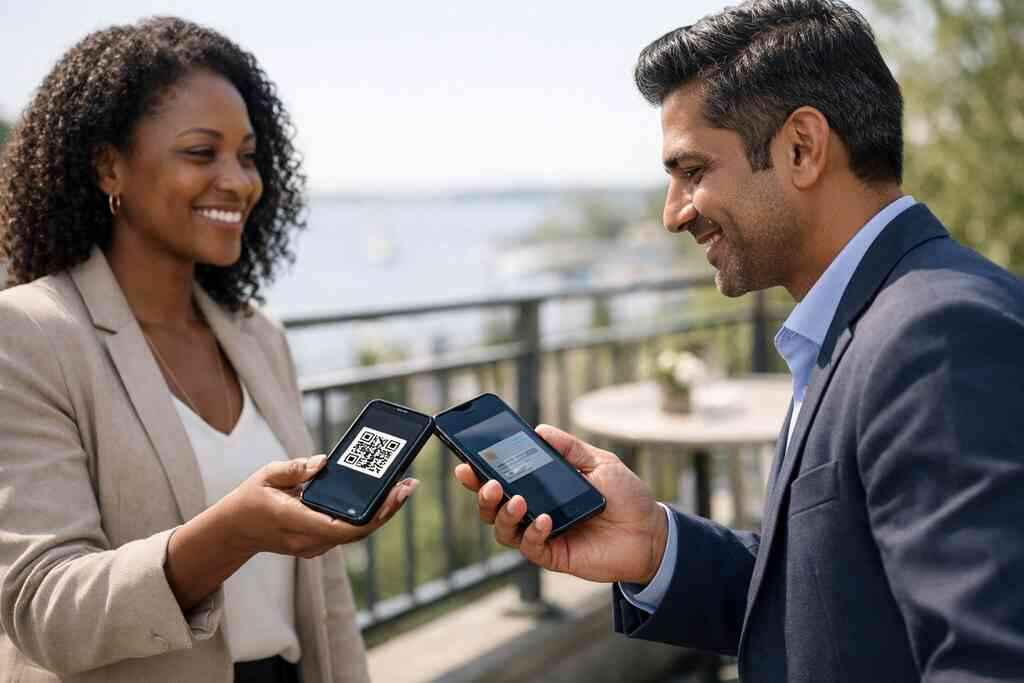
A trade-show badge clip snapped, and the paper card slid into a coffee-stained bag. That little moment can quietly cost a small business real money. If you have ever wondered why good conversations rarely become booked calls, this is usually where it starts. The card was handed over. Then it stopped working.
Why one missed follow-up can cost a small business more than a stack of paper cards
The hidden ROI leak in paper cards that sit in glove boxes, desk drawers, and trade show bags
Paper cards look cheap until you count the missed follow-up. A card in a glove box is not a lead. A card in a desk drawer is not a pipeline. It is a contact that went cold before you ever had a chance to help. That is the hidden ROI leak most small business owners feel before they can explain it.
The problem gets worse after events. Someone takes your card, likes your service, and means to call later. Then the week fills up. The card disappears under receipts, flyers, or a conference notebook. In a place like Long Island, New York, where schedules get packed fast, that delay matters more than most owners expect.
We hear this from clients almost every week. The conversation was strong, but the follow-up never happened. Sometimes the card smudged. Sometimes the phone number was typed wrong. Sometimes the prospect simply forgot your name. That is not only a sales problem. It is a systems problem.
How a digital business card keeps contact info moving while paper cards stop working the moment you hand them over
A digital business card changes the job of the card itself. Instead of ending the exchange, it starts the next one. A person can scan, tap, save, or open your online business card later. That keeps your contact info flowing after the handshake ends.
This is where digital business cards, virtual business cards, and electronic business cards matter. They do not sit still. They can point people to the right channel, whether that means email, a call, or a form. For small business owners, that movement helps create a real contact path instead of a one-time handout.
One consultant I met after a Hauppauge business mixer said the paper version felt “polite, but fragile.” He was right. The digital version let him send the same card to a client the next morning, then again to a referral partner that afternoon. That repeatable path is what gives digital card maker tools their value.
What small business owners in Long Island, New York notice first when lead capture gets easier
The first change is usually emotional. The follow-up feels less stressful. You stop wondering whether the card survived the event. You know the prospect has a clean way back to you. That relief is not small when you are juggling sales, service, and daily operations.
Then the numbers start to change. Leads become easier to track. Names do not vanish into pockets and purses. You can see who opened the card and who reached out. If you are using digital business cards for small business ROI tools well, the card becomes part of your revenue process, not a souvenir.
On Long Island, that shift shows up in practical ways. A realtor in Garden City can share one card during a showing and another during a closing meeting. A freelancer in Commack can send the same digital card after a coffee chat. A small business owner in Suffolk County can stay organized without carrying stacks of paper that never quite do the job.
What changes when your card starts acting like a sales tool instead of a handout
How a digital business card, virtual business card, or online business card turns one introduction into a repeatable contact path
Most paper cards are static. A digital business card is active. It can guide a new contact toward the next step without extra back-and-forth. That is why an online business card often performs more like a sales asset than stationery.
Here is the part most owners miss. The value is not only in sending your details. It is in controlling the path after the intro. You can direct people to book, reply, save your info, or explore more about your business. That creates consistency, which helps small business marketing teams a lot.
A virtual business card also reduces confusion. Instead of giving someone three different ways to reach you, you present one polished experience. That makes the exchange feel easy. It also keeps your business card details aligned with your current role, not last quarter’s title.
Why QR code business cards and NFC business cards reduce friction at conferences, client meetings, and local mixers
QR code business cards and NFC business cards remove the awkward pause. No one has to fumble for paper. No one has to type a name from scratch. A scan or tap can move the conversation forward in seconds. That matters at busy conferences, local mixers, and client meetings.
If you want the technical side, QR codes rely on the ISO/IEC 18004 standard. NFC uses near-field communication, which follows the ISO 14443 family for proximity data exchange. Apple’s Core NFC framework also supports tap-to-share experiences on compatible devices. In plain English, the technology is built for quick contactless sharing.
For a deeper comparison, you can review QR and NFC business cards for contactless sharing. NFC is often best for a polished tap experience. QR is useful when you want broad compatibility and easy scanning. Many teams use both, because different people prefer different habits.
The branding effect of custom branding, business card design, and digital business card templates on trust and recall
Design influences memory more than most people admit. A clean digital business card design signals order. A cluttered one signals rush. That does not mean the card has to look fancy. It means the business card template should match the trust you want to build.
Custom branding helps here. When your colors, logo, and message stay consistent, people recognize you faster. That is especially important in professional networking, where every contact starts to blur after a long day. A smart business card should look like your company, not like a random template.
If you are building or updating your layout, our templates page is a natural place to start. Keep the design simple. Keep the business card example readable. Keep the virtual card design focused on action. That approach usually works better than stuffing every detail onto one screen.
How digital card analytics can reveal which introductions are turning into real conversations
Analytics change the conversation from guesswork to evidence. You no longer assume the card worked. You can see whether people viewed it, clicked it, or followed through. That matters because not every introduction has the same value. Some names are warm. Some are not.
In practical terms, digital card analytics help you spot patterns. Maybe one event produced ten views and two calls. Maybe another produced many opens but no replies. That tells you where your message connects and where it misses. For small business owners, that is a cleaner way to judge effort.
If you want to go deeper, look at how to measure ROI from digital business cards analytics. The goal is simple. Learn which introductions become conversations. Then double down on the settings, audiences, and formats that create those outcomes.
The ROI engine behind paperless networking for sales professionals, real estate agents, freelancers, and corporate teams
How contactless sharing shortens the gap between meeting someone and starting a follow-up
Speed matters in networking. The shorter the gap, the better the response rate usually is. Contactless sharing removes a few irritating delays. That can be the difference between “I’ll email you later” and a booked follow-up by morning.
This is especially useful for sales professionals and freelancers. You meet someone at a show, a client site, or a coworking space, then share your card instantly. They do not have to read tiny print or retype your details. That convenience lowers friction, and lower friction often means more replies.
For many teams, how digital business cards work is the simplest way to explain the benefit internally. The mechanism is not complicated. The logic is. Shorter time to contact usually leads to better lead quality. That is the real ROI engine.
Why lead capture and follow-up automation matter more than collecting more names
Collecting names is easy. Converting names is hard. That is why lead capture and follow-up automation matter so much. A digital business card can help capture the contact, then move the person into a next step without manual re-entry.
This matters because memory fades fast after meetings. You may have a great talk with someone at a networking breakfast in Suffolk County, then lose the details by dinner. Automation helps protect that momentum. It reduces the admin work that usually kills follow-up.
One team we spoke with used to keep a spreadsheet of event contacts. It looked organized until the month got busy. Then half the names sat untouched. Once they moved to digital business cards, the contacts were easier to sort, tag, and revisit. That did not replace sales effort. It removed the busywork around it.
Where CRM integration can save time for small business marketing teams without adding more admin work
CRM integration is where digital cards start acting like infrastructure. Instead of copying contact details by hand, your team can move information into the systems they already use. That saves time. It also cuts down on typing errors and duplicated records. 
For marketing teams, this is more than convenience. It means faster segmentation, cleaner follow-up, and better visibility across campaigns. If your company uses a CRM, that connection can keep the whole process tighter. If it does not, you may still benefit from easier contact management.
Our digital business cards for networking and CRM integration guide can help you compare options. The key is simplicity. You do not want another tool that creates more admin work. You want one that reduces it.
When a digital card vs paper comparison changes the cost of acquisition in plain numbers
The cost difference is not only about printing. It is also about the lost opportunity from weak follow-up. Paper cards cost a little up front. The real cost shows up when the lead cools off before you reconnect. That is why digital card vs paper comparisons should include conversion, not just printing.
FactorPaper CardDigital Business CardInitial handoffEasyEasyFollow-up speedOften delayedUsually fasterUpdateabilityLowHighLead trackingLimitedStrongerReprint riskRealNoneFor a small business, that table matters because it changes cost of acquisition. If one better follow-up closes even one extra deal, the math shifts quickly. The card no longer feels like an expense. It becomes a lever.
How Long Island, Suffolk County, and NYC professionals use digital business cards for networking across busy commutes and events
Long Island professionals live with compressed schedules. People move between the LIRR, client offices, local events, and family obligations. In that environment, paper cards often get lost before they get used. Digital business cards fit the pace better.
We see this with NYC commuters too. They want a simple exchange on a train platform, in a lobby, or after a meeting. They do not want to dig through a wallet for the right card. They want a fast, clean handoff. That is why digital business cards on Long Island are getting attention.
A small business owner from Commack once said the best part was not the tap. It was the calm afterward. She knew every person she met had a clear way back to her, even if the rest of the day got chaotic. That kind of confidence is hard to price, but easy to feel.
The next move that makes a digital business card pay for itself faster
How to make a digital business card that matches your role, your audience, and your business card details
Start with the person you want to help. Then shape the card around that job. A sales rep needs different business card details than a freelancer. A real estate agent needs different proof points than a corporate team. The card should reflect that difference clearly.
If you are building one for the first time, focus on essentials. Name, title, company, contact paths, and one clear action. Keep the business card design clean. Keep the wording plain. The best virtual card design usually feels simple because it removes hesitation.
For setup details, create a digital business card after you map the use case. If you want a lead-focused version, review how to make a digital business card for leads. That sequence saves time and helps the card do more from day one.
When to choose a free digital business card and when premium digital card plans make more sense
A free digital business card can be enough for light networking. It is useful if you want to test the format, share contact info, and learn how people respond. That is a sensible place to start for some freelancers and new founders. But a free plan may not fit larger goals.
Premium digital card plans usually make more sense when networking becomes routine. If you need branding consistency, team coordination, or more structured lead capture, paying for more control can be worth it. The real question is not “free or paid.” It is “what has to work every week?”
For a clearer side-by-side, review digital card pricing and plans. If you are managing a team, the digital business cards pricing guide for small teams may be the better fit. That helps you match spend to actual usage.
How to review /templates/, /pricing/, /features/, /how-it-works/, and /nfc-digital-business-cards/ before you commit
Before you choose a platform, look at the basics in order. Templates tell you how flexible the design is. Pricing tells you whether the tool fits your budget. Features tell you what the card can actually do. How it works shows whether setup will be simple. NFC details matter if tap-to-share is important to you.
This review process keeps you honest. It prevents you from buying a tool for one feature you may never use. It also helps you compare the best digital business card platforms more clearly. The right platform should feel practical, not complicated.
If NFC is part of your workflow, start with NFC and QR card differences. If you care about support, check digital business card support before you commit. A good platform should make the process feel manageable, not heavy.
Why the best digital business card platforms support sustainable business cards without making setup feel complicated
Sustainability is a nice bonus, but not the only reason to go paperless. Sustainable business cards reduce waste and simplify updates. That matters when titles change, phone numbers move, or teams grow. It is easier to update a digital card than to throw away a stack of printed ones.
The best platforms make that simplicity obvious. You should not need a technical manual to create a professional card. You should be able to build a strong digital card maker setup, then adjust it as your role changes. That is where the product should save time, not create a new chore.
How small businesses near me in Long Island can decide whether an electronic business card exchange should replace paper entirely
If you are asking “near me” questions in Long Island, you probably want a practical answer, not a trend report. Start by counting how often you hand out cards. Then ask how often those cards lead to an actual conversation. If the answer is uneven, an electronic business card exchange may be the smarter default.
Do not force a full switch on day one. Test it at one event, one team, or one client meeting pattern. Watch what happens to follow-up, response speed, and recall. Then decide whether paper still earns a place in your process.
For Long Island businesses, the choice is often clearer than it looks. If your work depends on quick trust and fast contact, digital usually wins. And if you want a local place to compare options, the what Long Island SMBs need in a digital card maker guide is a smart place to look before you roll it out across the team.
Frequently Asked Questions
Question: How do digital business cards improve ROI for small businesses compared with paper cards?
Answer: Digital business cards can improve ROI because they help keep follow-up moving after the first meeting. Instead of handing someone a paper card that may get lost in a bag or drawer, a digital business card gives people a simple way to save your details, share contact info, and come back later through a link, QR code, or tap. That can make paperless networking more effective for small business owners, sales professionals, real estate agents, freelancers, and corporate teams. The biggest advantage is not just convenience; it is reducing the chance that a good introduction turns into a missed opportunity. With better lead capture, easier follow-up automation, and stronger contactless sharing, the card becomes part of your sales process rather than a one-time handout.
Question: What makes the blog post How Digital Business Cards Boost ROI for Small Businesses 2026 relevant for Long Island businesses?
Answer: The blog is especially relevant for businesses in Long Island, New York, Suffolk County, and NYC because local professionals often work in fast-moving environments where follow-up matters. Whether you are meeting people at client sites, in offices, or during professional networking, a virtual business card can make it easier to stay organized and respond quickly. For small business teams in the area, digital business cards near me is not just a search phrase; it reflects a real need for a cleaner, more efficient way to connect. Digital Business Cards is based in Long Island, so the focus stays practical and local, with an understanding of how busy schedules, commuting, and networking can affect lead conversion.
Question: What digital business card features should small business owners look for before choosing a platform?
Answer: Small business owners should start with the basics: a clean business card template, strong digital business card design, easy contactless sharing, and a simple way to create digital business card profiles without extra friction. It also helps to look for custom branding options, digital card analytics, and CRM integration if you want better lead capture and follow-up automation. If your team networks in person often, QR code business cards and NFC business cards may both be useful, depending on how people prefer to connect. The best digital business card platforms should make setup manageable, support a clear virtual card design, and allow you to update your business card details without reprinting. If you are comparing tools, reviewing digital card pricing, free digital business card options, and premium digital card plans can help you decide what fits your workflow.
Question: How do QR code business cards and NFC business cards help sales professionals and real estate agents network better?
Answer: QR code business cards and NFC business cards both reduce the delay between meeting someone and starting a follow-up. A scan or tap is faster than typing out contact details, which makes them useful for sales professionals, real estate agents, freelancers, and corporate teams that attend events or meet clients frequently. In real estate, for example, a smart business card can help agents share one clean digital business card example during a showing and then keep the relationship active afterward. For sales teams, contactless sharing helps make every introduction feel easier and more consistent. That matters because faster sharing usually means less drop-off, and less drop-off can lead to better follow-up rates.
Question: Is a free digital business card enough, or should I consider premium digital card plans?
Answer: A free digital business card may be enough if you are just getting started, testing paperless networking, or only need a simple way to share contact info. But if your business relies on frequent networking, stronger brand visibility, or team-wide consistency, premium digital card plans may make more sense. A paid option can be more practical when you want more control over digital business card features, business card design, and CRM integration. The right choice depends on how often you network and how much structure you need in your lead capture process. If you are comparing options, it is smart to look closely at digital card pricing, the available business card template choices, and whether the platform supports the workflow your small business actually uses.
Question: How can small businesses use digital business cards for LinkedIn, Apple Wallet business card sharing, and Google Pay card workflows?
Answer: These options can make a digital business card even easier to access and share, especially when your audience prefers simple mobile-friendly contact methods. A digital business card for LinkedIn can support professional networking by connecting your profile with your broader online presence. Apple Wallet business card and Google Pay card style sharing can also be convenient if you want your contact details to stay easy to reach on a phone. While not every platform offers every format, the goal is the same: make your electronic business card easy to find, easy to save, and easy to use. For small businesses, that convenience can support better follow-up automation, reduce the chance of lost contact details, and help your virtual business card work harder after the first conversation.