
Why small business owners are switching after a paper card fails at the worst moment
A paper card fails quietly, then all at once. You reach into a jacket pocket, and the stack is bent, damp, or gone. That is the moment many owners start looking at digital business cards and paperless networking. If you are reading this because follow-up keeps slipping, that frustration makes sense.
The forgotten card pile that turns a strong meeting into a missed follow-up
We hear this from clients almost every week. You leave a solid meeting feeling confident, then the card lands in a drawer with fourteen others. By the time you remember it, the context is fuzzy and the lead has cooled. A digital business card changes that because you can share contact info instantly and keep it in one place. That is the real difference between a paper stack and an electronic business card.
One small-business owner in Hauppauge told us she met three prospects at a mixer and collected paper cards from all of them. The cards got mixed with receipts in her bag. She had names, but no clean path to follow up. A virtual business card would have given her a cleaner handoff and a better chance to reply while the conversation was fresh. That is the kind of problem small teams feel in real life.
Why NFC business cards and QR code business cards are not the same networking move
People often compare NFC business cards and QR code business cards as if they are interchangeable. They are not. NFC uses a tap, while QR code business cards use a scan. That difference affects speed, device compatibility, and the feel of the exchange. If you want a smart business card that feels polished, the method matters.
Here is the part most people miss: the simplest tool is not always the best tool. NFC card tap to share feels premium and direct, but a scan to share business card works across more devices with less setup. Both support contactless sharing, yet they fit different workflows.
What Long Island professionals are noticing at mixers in Hauppauge, Commack, and NYC
On Long Island, the pace of networking is practical. People want quick, reliable exchanges at Hauppauge business mixers, in Commack co-working spaces, and during NYC commutes. They do not want to explain a clunky process twice. That is why digital business cards for networking keep showing up in conversations. The less friction, the better.
A Garden City real estate agent once told us she liked handing off one link instead of explaining where to find her. That mattered because her clients were juggling open houses, school runs, and weekend schedules. The exchange had to be fast. A digital card vs paper comparison often comes down to this simple point: do you want the lead to remember you, or just your card? For many small business owners in Long Island, New York, the answer is obvious.
What actually happens when someone taps versus scans your card
The mechanics are simple, but the experience is not identical. A tap and a scan feel different to the user. One is near-instant when the phone is ready. The other depends on camera access, framing, and lighting. If you care about smooth professional networking, those details matter.
How NFC card tap to share works with simple contactless sharing
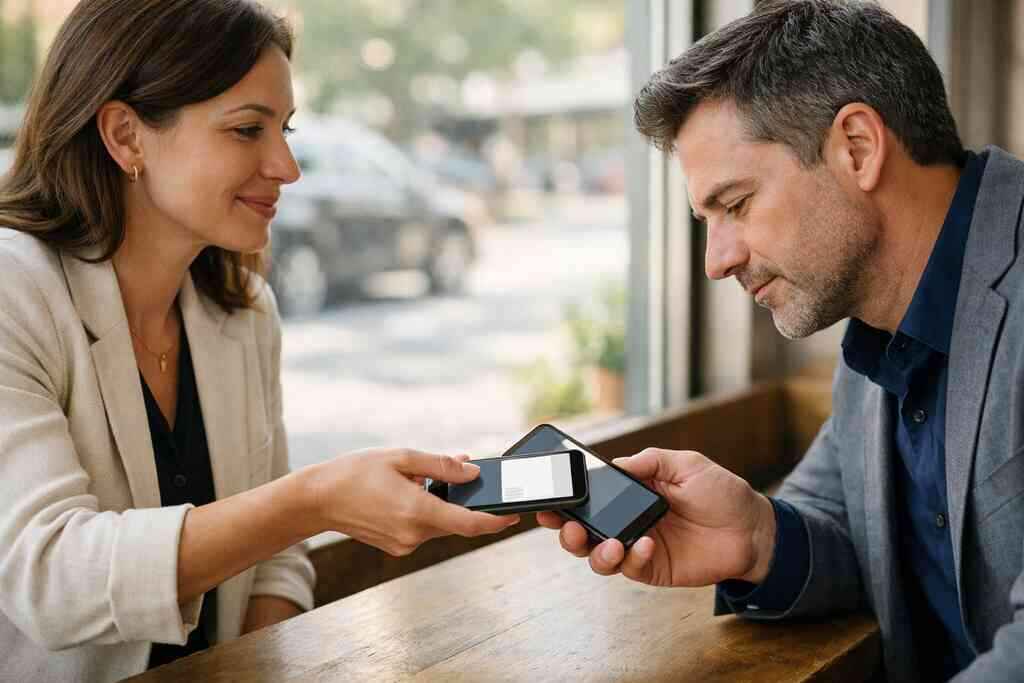
NFC stands for near-field communication. In plain language, it lets devices exchange data when they are very close. Most people know the tap from transit cards or mobile payments. In business cards, that same motion can open a profile, a link, or a contact handoff. That is why NFC technology for business cards often feels so polished.
The technical side is not hype. NFC commonly relies on standards such as ISO 14443 for short-range data exchange, and Apple’s Core NFC framework supports tap-based interactions on compatible devices. That said, actual behavior depends on the phone, the card setup, and the destination link. So if you are evaluating an NFC approach for NFC business cards for contactless small business networking, make sure the flow is tested on the devices your clients actually use.
Why QR code scanning follows the ISO IEC 18004 standard and when that matters
QR codes are not just random squares. They follow the ISO/IEC 18004 standard, which defines how the code stores and reads data. That matters because the format is widely recognized and easy to scan from a phone camera. For QR code scanning for networking, consistency is the quiet advantage. You do not need special hardware.
This is also why QR code business cards work so well for mixed audiences. The recipient usually needs only a camera and a browser. There is no tap point to miss and no NFC setting to wonder about. If you compare how NFC vs QR code business cards differ, QR tends to win on reach, while NFC often wins on tactile speed. The better choice depends on your audience, not the trend.
Which method is faster on crowded conference floors and in quick client meetings
Speed sounds simple until you are standing on a noisy floor with bad lighting. In quick client meetings, NFC usually feels faster because one tap can do the job. On crowded conference floors, QR can be just as fast if the code is visible and the phone camera opens smoothly. The friction often comes from the environment, not the technology itself.
FactorNFC business cardsQR code business cardsUser actionTapScanDevice dependenceMore device-specificBroad compatibilitySetup feelPremium and directFamiliar and flexibleBest use caseFast one-to-one sharingMass sharing and mixed devicesFor business networking with mobile devices, the winner is often the method people can use without thinking. That is why some teams keep both options available.
Where Apple Core NFC and browser based QR experiences change the user flow
Apple Core NFC can streamline the tap experience on supported devices. The user taps, and the profile opens with little delay. QR experiences usually route through the camera and browser first, which adds a small step. That extra step is not a dealbreaker, but it does matter when you are trying to keep momentum. A tiny pause can change how a lead feels about the exchange.
One freelancer in Commack told us she loved QR because prospects could scan during a break and save her card later. That worked well because her clients were often using mixed devices. Browser-based QR flows also make it easier to land on a branded page, which is useful for digital business card design and custom branding. If you want a practical setup, start with the flow your audience will finish.
The tradeoffs small business teams should weigh before choosing a digital card
The best card is not the fanciest one. It is the one your team will actually use. That is especially true for sales professionals, real estate agents, freelancers, and corporate teams. You need a setup that fits your budget, your workflow, and your follow-up habits. Otherwise, even a good tool becomes shelfware.
Why NFC digital business cards can feel premium but may not fit every budget or workflow
NFC cards have a strong first impression. They feel tactile, modern, and efficient. For someone who values in-person impact, that can be a real advantage. Still, an NFC setup may not fit every team, especially if people need easy remote sharing too. That is where workflow matters more than image.
We have seen teams choose NFC, then realize they still need a link-based backup for email signatures and LinkedIn. That is normal. A digital card maker should support more than one sharing path if you want flexibility. If you are comparing digital card pricing and plan options, focus on what your team will use daily, not what sounds impressive in a meeting. The most practical tool is usually the one with fewer handoffs.
When QR code business cards make sense for freelancers, real estate agents, and lean teams
QR code business cards are often the easiest starting point. They work well for freelancers who move between clients, real estate agents who meet buyers in the field, and lean teams that need low-friction sharing. A QR code can live on a phone, badge, flyer, or printed handout. That flexibility is useful when your networking happens in more than one place. If you serve clients across Long Island, New York, and into NYC, QR can reduce setup stress. It also plays nicely with business card template choices and digital business card templates that let you keep the look consistent. For teams exploring digital business cards for real estate agents in New York, QR often gives the cleanest balance of speed and reach. The card does not need to be complex to be effective. 
How digital card analytics, lead capture, and follow-up automation change the value of each share
This is where digital business card features start to matter. If your card platform includes digital card analytics, you can see how often people engage. If it supports lead capture, you can collect useful contact details after the first interaction. If it connects to follow-up automation or CRM integration, the exchange becomes more than a name swap. It becomes a system.
A 2023 Adobe survey reported that 58% of professionals had lost a paper card before following up. That number makes sense if you have ever cleaned out a laptop bag after a conference. Digital business cards reduce that loss because the contact stays accessible. For teams that need digital business cards with CRM integration, the real value is not the card itself. It is the cleaner follow-through.
What custom branding, digital card design, and business card templates can do for trust at first glance
People judge quickly. That sounds harsh, but it is true. Good virtual card design helps your contact feel trustworthy before anyone reads a long bio. A clean business card example with consistent colors, logo placement, and readable business card details tells the other person you pay attention. That matters in professional networking.
If you are building a profile from scratch, use a solid business card template rather than forcing everything into a cluttered layout. Templates help you keep the message clear while protecting your brand. Digital business card templates also make it easier to keep teams aligned across departments. For a simple starting point, visit a template-driven setup and match it to your brand before you share it widely.
How paperless networking supports sustainable business cards without sacrificing professionalism
There is also the practical side. Paperless networking cuts down on reprints, waste, and outdated inventory. That supports sustainable business cards without making you look less polished. In fact, many people see digital sharing as more modern and more considerate. The point is not to eliminate paper at all costs. The point is to stop depending on it.
Digital card vs paper is not just a style debate. It is a workflow decision with environmental and organizational benefits. If your team values sustainability, digital formats help you align your brand with that message. At the same time, you still need a clean, professional presentation. That balance is why many companies call these electronic business cards instead of “just links.”
Which setup gives you the cleanest path from contact swap to closed-loop follow-up
Now we get to the part that matters most. A card is only useful if it moves someone toward the next conversation. That means the setup should match your brand, your habits, and your follow-up process. If you make this choice well, the card becomes part of your sales rhythm, not a side project.
How to make a digital business card that matches your business card details and brand
Start with the basics. Your digital business card should reflect the same name, title, phone, email, and company details you use everywhere else. Consistency builds trust. If your profile says one thing and your email signature says another, people hesitate. That hesitation costs you replies.
If you want to create a digital business card that feels credible, keep the layout simple and the language direct. Include only the details people actually need. Then add one clear call to action. That might be a booking link, a portfolio, or a request to connect on LinkedIn. A digital business card for LinkedIn works best when the path is obvious.
When to use the how it works flow versus a template driven digital card maker
A guided setup works well if you want speed. A template-driven setup works well if brand control matters more. Both can be smart choices, depending on your team. The question is not which method sounds better. The question is which one your people will finish and keep updated.
For onboarding, the how digital business cards work flow can remove confusion. For marketing teams or growing firms, digital business card design often benefits from a structured template. That is especially true for corporate teams that need consistency across multiple users. If you are building for scale, simplicity wins more often than complexity.
How pricing conversations should frame free digital business card options against premium digital card plans without guessing
Pricing deserves an honest look. A free digital business card can be useful for testing the format and learning the basics. Premium digital card plans may make sense when you need branding, team management, analytics, or other advanced controls. The right choice depends on use case, not ego. Do not guess your way through it.
That is why digital business cards for small business owners should be evaluated carefully. Compare what each plan supports, what it leaves out, and how often your team will use it. If the platform helps you share contact info better, it may justify the spend. If not, a simpler setup may be enough.
Why Long Island, New York small business owners should compare the best digital business card platforms by use case, not hype
Long Island teams are practical. They want tools that work in a parking lot, at a mixer, or between client appointments on the LIRR. That is why the best digital business card platforms should be judged by fit, not buzz. Ask how the platform supports digital business card app usage, team consistency, and sharing in real situations.
If you are based in Suffolk County or working into NYC, test the card where you network most. That might mean a one-on-one meeting, a trade show, or a fast exchange after an event. For a broader rollout, review the digital business cards for lead capture at events approach and see whether it matches your process. The right card should shorten follow-up, not complicate it.
What to check before you share contact info with clients, prospects, or teams in real time
Before you share, check the basics. Make sure your name is correct, your phone works, and your links open cleanly. Confirm that your share contact info flow looks good on mobile. If you use Apple Wallet business card support or a Google Pay card style presentation, test both. The experience should feel smooth, not improvised.
A few quick checks go a long way:
- Does the card open quickly on common phones?
- Is the text readable at a glance?
- Does the contact save cleanly?
- Is the branding consistent across devices?
- Does the follow-up path make sense?
If you answer yes to those five, you are ahead of most people. You do not need to solve everything today. Start with one clean setup, test it in the field, and adjust from there. If you want a smarter place to begin, explore a digital business card platform that fits how you already work.
Frequently Asked Questions
Do digital business cards work without an app?
Yes, many digital business cards can be shared through a link or QR code without requiring a dedicated app on the recipient’s phone. That is one reason they work well for electronic business card exchange in everyday networking. The key is to make sure the landing experience is mobile-friendly and easy to save. If you want a simple setup, compare it with the platform’s sharing flow before you roll it out. A clean sharing path matters more than app count.
Can I customize the design of my digital card?
Usually, yes, but the level of customization depends on the platform and plan. Look for options that support custom branding, logo placement, color control, and clear business card design choices. Good customization helps your card feel like part of your brand, not a generic page. If you are comparing options, review the available templates and make sure they match your style before you publish.
Is NFC safe for sharing contact info?
NFC itself is widely used for short-range sharing, and it does not require physical contact with the other person’s device. Still, safety depends on what information you choose to share and where the card sends people. Keep your profile current and avoid exposing unnecessary details. If you manage data for a team, review consent and storage practices carefully, especially with GDPR considerations in mind. That is good housekeeping, not paranoia.
Which is better for small business networking, NFC or QR code?
It depends on your audience and your setting. NFC feels faster and more premium in face-to-face settings, while QR code business cards offer broader compatibility and easier deployment. For many small business networking situations, QR is the safer default. For a polished one-to-one exchange, NFC can make a strong impression. Many teams keep both so they can adapt in the room.
How do digital card analytics help with follow-up?
Digital card analytics show whether someone viewed, clicked, or engaged with your card after the exchange. That helps you prioritize follow-up and learn which messages work. When analytics pair with lead capture and CRM integration, you can move faster and waste less time guessing. If that sounds useful, review the platform’s analytics features and decide what level of tracking your team actually needs.
What is the best way to make a digital business card for a small team?
Start with a consistent template, standard business card details, and one clear sharing method. Then decide whether you need NFC, QR, or both. For corporate teams, uniform branding and easy updates matter more than flashy design. A guided setup can help you launch quickly, while a template-based approach keeps the whole team aligned. If you want a practical process, study the platform’s how it works page and build from there.