

Why some online business cards get saved and others get ignored
You hand someone your card, and they glance once. Then they decide. That tiny pause matters more than most people think, and it is where online business card conversion is won or lost. If you are reading this because your contacts keep going cold after meetings, that frustration makes sense. A card can look modern and still fail badly. The difference usually comes down to trust, clarity, and speed.
The five-second trust test that decides whether someone keeps scanning or moves on
Most people do not judge a digital business card the way they judge a website. They judge it like a promise. Does it look clean, current, and easy to use? Does the business card details section feel complete without feeling crowded? If the answer is yes, they keep scanning. If not, they close it and move on.
We hear this from clients almost every week. The contact exchange feels smooth to you, but the viewer is making a fast decision. That is why a trust-building digital profile matters so much. A strong photo, a readable title, and clear contact paths reduce hesitation. A confusing layout does the opposite, even when the design is beautiful.
One consultant in a Hauppauge conference hallway had the right credentials but too many buttons. His card looked polished, yet it buried his phone number under three extra taps. Once he simplified the profile, people started reaching out faster. The lesson was simple: people save what feels immediate.
How paper card habits still shape digital card conversion in Long Island, New York, and NYC meetings
Paper habits die slowly. In Long Island, New York, and in NYC meetings, many people still expect a card to act like a quick reference, not a puzzle. They want the name, the role, the number, and one obvious next action. That old habit shapes how they respond to digital business cards for networking today. If your digital card feels slower than paper, conversion drops.
Here is the part most people miss. A paper card is often reviewed later, while a digital card is judged on the spot. That means the digital card vs paper comparison is not only about format. It is about momentum. At a Commack co-working meetup, that momentum may vanish in a crowded room if your card takes too long to load. The faster someone can understand you, the better your odds.
What a conversion-focused profile layout changes before the first tap or scan
A conversion-focused profile layout removes thinking from the experience. It puts the most important details where the eye lands first. It also makes share contact info actions feel natural instead of forced. That is especially important for a virtual business card used across mobile devices. The best layouts answer three questions immediately: who you are, what you do, and how to reach you.
For readers comparing tools, the right structure often matters more than one flashy add-on. If you want a practical starting point, review a conversion-focused digital profile layout. A good layout usually includes:
- A clear name and role
- One primary call to action
- Fast access to phone, email, or text
- Optional links that do not crowd the screen
- Branding that supports recognition
The cleanest cards feel almost invisible. That is the point. They help someone act without strain, and that is what improves conversion.
The details that quietly turn a digital business card into a stronger close
Small choices add up fast. The right digital business card design can feel effortless, while the wrong one creates friction before the first conversation ends. Many people focus on the tech and ignore the content hierarchy. That is a mistake. The screen has limited space, so every line should earn its place.
Which business card details belong on the screen and which ones create friction
A good online business card is not a full biography. It is a decision tool. Put the essentials on top: name, title, company, and one preferred contact method. Then add supporting paths like email, website, or LinkedIn only if they help the next step. Too many options can slow the user down.
Here is what belongs near the top:
- Name and professional title
- One-sentence value statement
- Phone or text option
- Email address
- Website or portfolio link
- Location, if local trust matters
Here is what often creates friction:
- Long paragraphs
- Repeated links
- Overly formal language
- Unclear job titles
- Too many calls to action
A digital business card app should make that hierarchy easy, not fight it. The best electronic business card feels like a sharp introduction, not a cluttered drawer. If you are serving clients in Suffolk County or NYC, clarity matters even more. Busy people notice the difference right away.
How custom branding and virtual card design build a more memorable digital identity
Custom branding makes your card feel like you. That includes colors, logo use, typography, and the visual rhythm of the page. A strong electronic business card design with custom branding helps people remember where they met you. It also creates consistency between your card, your email signature, and your website. That consistency builds trust without forcing it.
A real estate agent in Garden City once had a card that looked generic and forgettable. The contact info was correct, but the design gave no visual anchor. After she switched to a cleaner, branded layout, people recognized her card more easily during follow-up. That is not magic. It is memory support.
If you need examples, a custom branding approach for digital cards can help you see what works. The best virtual card design makes your professional identity feel coherent. It also supports digital business identity and branding across every handoff. That matters for sales professionals, freelancers, and corporate teams alike.
Why digital business card templates matter more than most people think for speed and clarity
Templates are not shortcuts. They are decision filters. The right digital business card templates help you launch faster while keeping the design readable. A weak template often hides the key action or spreads attention too thin. That slows response, even when the card looks polished.
For industry-specific use, templates can be especially useful. A template set for real estate professionals can support listing links, contact pathways, and local trust cues. That makes sense because real estate agents need speed and credibility in every interaction. Small business owners and corporate teams need the same, just in different formats. Templates reduce guesswork and protect consistency.
The small wording choices that make a stronger call to action without sounding pushy
Words matter more than most people expect. “Contact me” can feel stiff. “Text me directly” feels quicker and more human. “Save my details” feels polite and low-pressure. A strong call to action should sound like help, not a demand.
We have seen simple wording changes improve response rates in everyday networking. The point is not to sound clever. The point is to make the next step obvious. Try phrases like:
- Save my contact
- Text me anytime
- View my work
- Book a quick call
- Share your details
For a digital business card example, the best wording usually feels conversational and immediate. That approach supports paperless networking because it removes social friction. People respond better when they know exactly what to do next. And they respond faster when the ask feels natural.
NFC, QR, and instant sharing: what actually makes contact exchange feel effortless
The sharing method matters more than the logo on the screen. A smart business card strategy should match how people behave in real rooms, on busy sidewalks, and between sessions at events. Some contacts want a scan. Others want a tap. Many want both. The best setup respects all three.
When QR code business cards beat NFC business cards and when tap to share wins
QR code business cards shine when the other person is already holding a phone. They are simple, familiar, and fast. NFC business cards can feel even smoother because tap-to-share removes the camera step. The right choice depends on context, device comfort, and how often you meet people face-to-face. 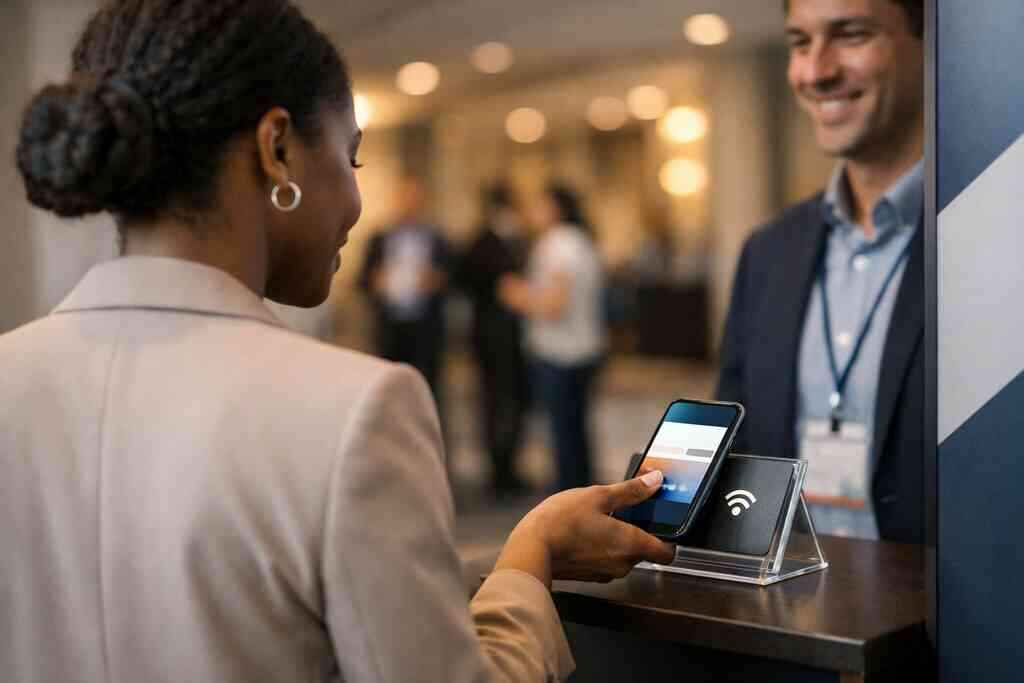
If you want a deeper comparison, see QR code and NFC business cards in 2026. In practice, QR often wins in large events and mixed-device rooms. NFC often wins in high-touch introductions where speed feels premium. For mobile-first networking, both can work well. What matters is that the person can use the card without thinking.
Why ISO-aligned QR code behavior and Apple Core NFC reliability matter in real use
QR codes follow a recognized standard, ISO/IEC 18004, which helps ensure consistent scanning behavior. That matters when lighting is poor or people are moving fast. NFC uses short-range data exchange, and Apple’s Core NFC framework supports reliable tap interactions on compatible devices. Those details sound technical, but they affect everyday trust. In real life, reliability is everything. If a scan fails once, some people never try again. If a tap does not register, the moment is gone. That is why standards matter. They reduce the chance of awkward pauses. They make contactless sharing feel normal, not fragile. ### How contactless sharing works better for sales professionals, real estate agents, freelancers, and corporate teams
Different users need different paths, but the goal is the same. You want instant contact exchange without extra steps. Sales professionals benefit from fast follow-up links. Real estate agents need immediate trust and easy property-sharing. Freelancers want a card that shows personality without clutter. Corporate teams need consistency across many employees.
A guide to digital business cards for Suffolk County small businesses can help if your team networks locally. On the projects we have seen this year, the smoothest exchanges happen when the card matches the situation. A trade show badge needs different behavior than a lunch meeting in Long Island, New York. That is why electronic business card exchange should feel flexible.
What digital card analytics and lead capture reveal after the share happens
The share is not the finish. It is the start of measurement. Digital card analytics show whether people opened the card, tapped a link, or returned later. Lead capture reveals how many contacts actually moved beyond a polite exchange. That information helps you improve the card instead of guessing.
If you want a closer look, review digital card analytics for follow-up tracking. Analytics matter because memory is unreliable after events. A crowded room can blur together fast. Data gives you a trail. And that trail helps you refine the message, the layout, and the call to action.
How CRM integration and follow-up automation can reduce lost leads after networking events
A contact saved too late is often a lead lost. That is where CRM integration and follow-up automation help. They move the contact into your system while the conversation is still fresh. They also reduce the chance that a promising lead stays buried in a phone note. For busy teams, that matters a lot.
You can also review CRM integration for digital business cards to see how the workflow connects. A well-built setup can support streamlined prospect follow-up after conferences, mixers, and local meetings. It is especially useful after a Hauppauge business mixer, where dozens of introductions can blur together by the end of the night. The goal is simple: capture the contact while intent is still high.
The next move for a card that converts better on Long Island and beyond
The best card is not the fanciest one. It is the one people understand quickly and trust enough to save. If you are based in Long Island, New York, or work in NYC often, your card should fit both environments. That means it needs to look polished, work fast, and stay easy to update.
How to make a digital business card with the right mix of template choice, branding, and clarity
If you are figuring out how to make a digital business card, start with the message before the style. Decide what you want the card to do. Then choose a template that supports that goal. A strong card usually has one clear path, not five competing ones. That is the heart of conversion-focused profile layout work.
For many users, the simplest path is best:
- Pick a clean template.
- Add only essential contact details.
- Match colors to your brand.
- Choose one main action.
- Test it on a phone.
That process keeps the card useful instead of decorative. It also supports mobile-device-based contact exchange, which is now expected in most networking settings.
When to compare free digital business card options against premium digital card plans
A free digital business card can be enough for testing. It may help you validate the layout and message. But premium digital card plans often make sense when you need more control, stronger branding, or team consistency. The right choice depends on how you network and how often you follow up.
For a clearer breakdown, see the Pricing & Plans page when you are ready to compare options. Be careful not to decide on price alone. Look at the whole workflow. If the free option slows your follow-up, the hidden cost can be bigger than the monthly fee. That is why digital card pricing should always be judged against your actual use.
Which digital business card features matter most for paperless networking in Suffolk County and NYC
The most useful digital business card features are the ones that reduce friction. That usually means fast sharing, clean design, flexible contact links, and mobile-friendly display. Paperless networking and sustainable business cards also appeal to people who care about less waste. But convenience still leads the decision. Sustainability helps; usability closes.
For local professionals, the best digital business cards near me are the ones that fit the room you are in. Suffolk County mixers are not the same as downtown Manhattan receptions. The card should work in both. That is why digital business cards near me is really a question about adaptability. Long Island, New York, professionals benefit most from cards that feel local and polished at the same time.
How to choose the best digital business card platforms for your workflow and your audience
The best digital business card platforms are not always the ones with the longest feature list. They are the ones that match your routine. If you live in your CRM, prioritize integration. If you work visually, prioritize design control. If you attend many events, prioritize fast sharing and analytics. That is the real test.
A few questions help narrow the field:
- Does it support your current workflow?
- Can your audience use it easily?
- Does it help you follow up faster?
- Does it let you control branding?
- Does it keep contact exchange simple?
A feature guide for sales teams can help if your role is revenue-focused. The answer should fit your audience, not just your preferences. That is what makes an electronic business card perform better over time.
What to ask before you update your card for professional networking at your next Hauppauge mixer or Commack co-working meeting
Before you update anything, ask three honest questions. Can someone understand my card in five seconds? Can they save my contact without effort? Will I know what happened after I share it? If the answer to any of those is no, the card still has room to improve.
If you attend a Hauppauge mixer or work from a Commack co-working space, test the card in the exact setting where you use it. Bright lights, noisy rooms, and hurried introductions expose weak design fast. Review digital business cards for networking in Long Island if you want a local lens. Then make one small change, test again, and keep the version that gets the easiest response. You do not have to perfect everything today, and you do not have to figure it out alone. Start by opening your current card on your phone and checking what disappears first.
Frequently Asked Questions
Question: What makes an online business card convert better in 2026, and how does the blog What Makes an Online Business Card Convert Better in 2026 help with that?
Answer: In 2026, the cards that convert best are the ones that feel clear, fast, and trustworthy right away. A strong online business card should present the most important business card details first, make it easy to share contact info instantly, and guide the viewer toward one simple next step. That is where a conversion-focused profile layout matters. The blog What Makes an Online Business Card Convert Better in 2026 focuses on practical improvements like cleaner business card design, better wording for a stronger call to action, and a smoother mobile-first experience. If you are using digital business cards for networking in Long Island, New York, Suffolk County, or NYC, those small details can make a big difference in whether someone saves your card or moves on. Digital Business Cards is built around that same idea: helping people create digital business card experiences that feel simple, professional, and easy to follow up on.
Question: Should I use QR code business cards, NFC business cards, or both for professional networking?
Answer: For most people, both QR code business cards and NFC business cards can be useful because they support different networking situations. QR code business cards are familiar and work well when someone already has their phone out, while NFC business cards can make contactless sharing feel even more immediate with a tap. The best smart business card strategy is usually the one that matches how you actually meet people at events, meetings, and everyday conversations. If you are attending professional networking events in Long Island, New York, or NYC, having both options can help reduce friction and improve virtual business card engagement. Digital Business Cards is designed to support that kind of flexible sharing so people can exchange information quickly without making the interaction feel complicated.
Question: What digital business card features matter most for sales professionals, real estate agents, freelancers, and corporate teams?
Answer: The most useful digital business card features are the ones that make contact exchange simple and follow-up easier. For sales professionals, that often means quick access to lead capture and CRM integration. For real estate agents, it may mean a polished digital business card design that supports trust and easy sharing. Freelancers often benefit from a clean virtual card design that shows personality without clutter, while corporate teams usually need consistency across multiple profiles. In every case, a good business card template should support branding, readability, and mobile use. Digital Business Cards helps users create a digital business card that fits their workflow instead of forcing them into a rigid format. If you want a free digital business card to test the experience or a premium digital card plan for more polish and control, the best choice depends on how you network and follow up.
Question: How do digital card analytics, lead capture, CRM integration, and follow-up automation help after I share my card?
Answer: These tools matter because the share itself is only the beginning. Digital card analytics can show whether someone opened your card, tapped a link, or returned later. Lead capture helps you collect contact information while the conversation is still fresh, and follow-up automation can reduce the chance that a strong introduction gets lost after the event. CRM integration is especially helpful for sales professionals, small business teams, and anyone who needs streamlined prospect follow-up after networking. That is one reason digital business cards can work better than paper in busy settings: they help you move from introduction to action faster. While exact features can vary by platform, the general goal is the same: make it easier to track, organize, and continue the conversation after sharing your electronic business card.
Question: What should I look for when choosing the best digital business card platforms or digital business card templates for my workflow?
Answer: Start with how you actually network. The best digital business card platforms are the ones that support your routine, your audience, and your follow-up process. If you care most about digital business card features like easy sharing, clear branding, and practical lead capture, then choose a platform that supports those priorities without adding unnecessary complexity. Good digital business card templates should keep the layout clean, highlight essential business card details, and support a stronger call to action. If you are comparing options in Long Island, New York or searching for digital business cards near me, look for a solution that feels easy to use on a phone, works well for digital business cards for networking, and supports a branded digital identity. Digital Business Cards is focused on helping people build a card that feels professional, useful, and ready for real-world contactless sharing.