
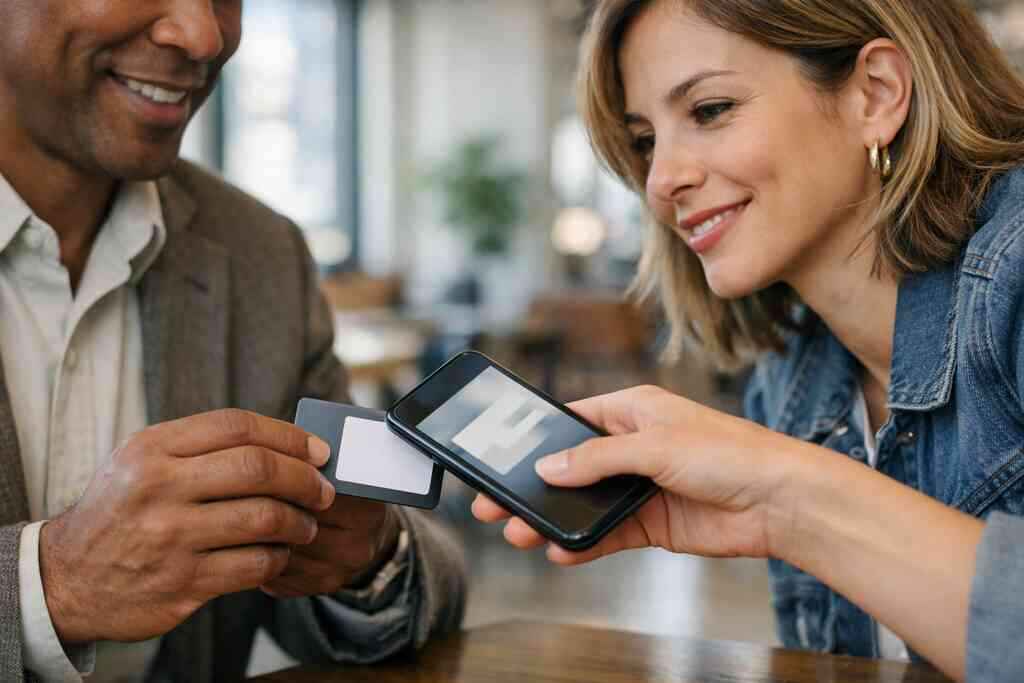
The follow up that disappears after the handshake
You have probably felt that small sting after a good conversation. The card is gone, the notes are unclear, and the lead quietly slips away. That is frustrating, and it happens more often than people admit. For many professionals, the real cost is not the print bill. It is the missed follow up that never gets measured.
Why paper cards and sticky note reminders fail to show the real cost of lost leads
Paper cards look simple, but they hide messy behavior. A card lands in a pocket, then a coat, then a desk drawer. A sticky note helps for a day, maybe two. After that, the memory fades, and so does the opportunity. In our experience, the biggest mistake is assuming a card exchange equals a future conversation.
A digital business card changes that equation because the exchange can be observed. A digital business card can record a tap, scan, or share event, which gives you a real signal. That signal matters because it shows interest before the inbox does. For sales professionals, freelancers, and small business owners, that is the difference between guessing and knowing. It also fits the way people actually network in Long Island, New York, where one strong local connection can lead to three more.
Here is the part most people miss. Lost leads do not always feel lost right away. They feel like, “I’ll reach out later.” Then later becomes never. A paper card cannot warn you that the follow up went cold. A digital card can at least show where the trail started.
How a digital business card turns every share into a trackable contact moment
A digital card maker can do more than display your name and phone number. It can turn each share into a measurable event. That event may be a scan, a tap, a page view, or a contact save. The exact setup depends on the platform, so you should verify what the app actually supports before you rely on it. Still, the core idea is simple: every exchange becomes a trackable contact moment.
That matters for paperless networking because timing shapes memory. If someone scans your card right after a conversation, that action shows intent. If they save your contact and return later, that suggests a warmer lead than a casual glance. Some professionals even use a digital business card example during a meeting so they can see which contacts respond fastest. That is useful when you are deciding who needs a same-day email and who can wait.
A Garden City real estate agent once described a familiar pattern to us. She met ten people at one event and handed out only paper cards. Later, she could not tell who was serious and who was being polite. After moving to a virtual business card, she could separate quick responders from silent contacts. That changed her follow up rhythm immediately.
What follow up ROI actually means for sales professionals, freelancers, and small business owners in Long Island, New York
Follow up ROI means you can connect your outreach effort to real outcomes. That may be a booked call, a proposal request, or a saved contact that later converts. It is not just about clicks. It is about the path from first share to revenue. For many professionals in Suffolk County and NYC, that path is where the whole business case lives.
The idea becomes clearer when you break it down. If you meet twenty people and only know three opened your card, you have a weak read on performance. If you know those same three replied within hours, your next move gets sharper. That is why digital card analytics for follow-up ROI in Long Island, New York matter so much. They help you connect networking effort to actual business results.
Follow up ROI also looks different by role. Sales professionals care about pipeline movement. Freelancers care about inquiries and repeat work. Small business owners care about leads that become steady customers. The metric changes, but the principle stays the same. Measure the interaction, then measure what happened next.
What the numbers know before your inbox does
Analytics are often more honest than memory. Your inbox may feel busy, but it does not tell you which introduction mattered. Numbers help you see which shares turned into real interest, and which ones faded. That is especially helpful when you are choosing between digital business cards with lead capture and conversion tracking and a simpler online business card setup. The goal is not data for its own sake. The goal is better decisions.
Which digital card analytics matter most for lead capture, contactless sharing, and conversion attribution
The most useful metrics are usually the ones tied to action. You want to know who viewed, who saved, who clicked, and who came back. If your platform supports lead capture, conversion attribution becomes far easier to understand. That means you can connect one share to one later result instead of treating every contact like a mystery.
Look for these signals first:
- Card views
- QR scans
- NFC taps
- Contact saves
- Link clicks
- Repeat visits
- Form submissions
- Shares from shared links
The best digital card analytics and lead quality metrics tell you more than volume. They tell you intent. A contact save often matters more than a quick glance. A repeated visit may matter more than a single click. In practice, those small signals help you rank leads before you spend time on outreach.
How QR code business cards and NFC business cards can reveal different engagement patterns
QR and NFC often behave differently, and that difference can be useful. QR code business cards usually work well when people are already looking at your card, a screen, or a display. NFC business cards often feel faster at close range because a tap seems almost effortless. The mechanics differ, and so do the signals they create. QR may show more deliberate scanning, while NFC may show more spontaneous engagement.
The standards matter here too. QR code systems are commonly built around ISO/IEC 18004, and NFC exchange relies on standards like ISO 14443. On Apple devices, the Core NFC framework affects how tap-based experiences behave. That does not mean every digital business card app offers the same reliability, so test on actual devices before relying on assumptions. If you want a deeper comparison, NFC business cards and QR sharing patterns for professionals is worth reviewing.
The difference shows up at events too. At a Hauppauge business mixer, a tap can feel smoother when people are standing in a line. At a Commack co-working space, a QR code may work better when someone wants to scan and keep moving. One is not universally better. The right choice depends on how your contacts behave.
Why CRM integration and follow up automation make digital card analytics more useful than a simple contact count
A simple contact count is nice, but it is not enough. Ten new contacts may mean ten cold leads, or one very warm opportunity and nine distractions. CRM integration changes that because it places each contact into a system you can actually work. That gives your digital card analytics context. Without that context, the numbers are interesting but incomplete.
Follow up automation can help you respond faster without sounding robotic. If someone fills out a card form, your CRM can trigger a welcome email or a task reminder. If a lead is tagged as high intent, you can move faster. That is where CRM integration for digital business card follow-up automation becomes especially valuable. It links networking to sales pipeline tracking in a practical way.
The mistake we see most often is waiting too long to connect systems. A card gets shared. The lead gets saved in a phone. Then nothing happens. That gap is where ROI disappears. Good automation closes that gap before it grows.
What custom branding and digital business card design can change about scan rates and response behavior
Design affects behavior more than many people expect. A clean layout can make your contact details easier to trust. A cluttered one can make people hesitate. Custom branding also matters because people respond to clarity and familiarity. If your digital card design looks thoughtful, it feels safer to save and share.
That is why custom branding tips for digital business card design deserve attention early. The right business card template can make your card easier to read on a phone. Good hierarchy helps people find your name, role, and main action fast. Strong contrast, simple icons, and a focused call to action often improve response behavior. A digital business card for LinkedIn can work especially well when the profile feels consistent across channels.
One freelancer in a Long Island co-working group changed only the header image and button labels. Nothing else. The result was not magic, just cleaner behavior. People clicked less randomly and saved the card more often. Small design choices can create measurable shifts.
How to compare digital card vs paper results without guessing at performance
You do not need perfect data to compare the two. You do need the same measurement window and the same follow up process. Track how many cards were shared, how many contacts replied, and how many became real opportunities. That is the cleanest way to judge digital card vs paper performance. Anything less invites guesswork. 
MeasurePaper CardDigital CardContact traceabilityLowHigherFollow up timingHard to trackEasier to measureLead captureManualOften built inConversion attributionWeakStrongerSharing frictionPhysical handoffTap, scan, or linkIf you want a grounded comparison, review digital business cards vs paper networking costs and results. The numbers may surprise you, especially once you factor in reprints, lost cards, and missed follow ups. Paper may feel cheaper at first. It often becomes more expensive when you count missed opportunities.
When analytics become your next best sales move
This is where the data starts paying you back. Analytics are only useful if they change what you do next. A digital business card can support that shift from the start, but only if you set it up with follow up in mind. That means thinking about the card, the message, and the handoff together. If you are using digital business cards for sales teams and pipeline tracking, this part matters a lot.
How to create digital business card setups that support measurable follow up from the start
Start with the action you want. Do you want a reply, a booking, or a contact save? Build the card around that goal. If the setup is too broad, your data becomes muddy. A smart business card should make the next step obvious.
A solid setup usually includes:
- One clear primary call to action
- A short contact form or lead capture path
- A visible phone or email option
- Branding that matches your website and LinkedIn
- A simple way to save contact info
If you are learning how to make a digital business card, keep the first version lean. You can always add more later. What matters most is that the card supports measurable follow up. A cluttered card makes tracking harder. A focused one makes the next move obvious.
Which business card details should be tested to improve response in professional networking
Test the details people notice first. That usually means your name line, headline, button text, and profile image. You can also test different business card details, such as a direct calendar link or a simple email prompt. The goal is to see what reduces friction. Small changes can reveal what your audience trusts fastest.
Here is a practical test list:
- Headline clarity
- Photo versus logo
- Short versus long bio
- “Save Contact” versus “Get in Touch”
- One link versus multiple links
- QR placement
- Tap instructions for NFC business cards
These tests matter in professional networking because people make quick judgments. If the card is easy to understand, they act faster. If it feels busy, they delay. Delay hurts response rates. That is true at a NYC breakfast meeting and at a Long Island chamber event.
How sales teams, real estate agents, and corporate teams can use analytics to sharpen their follow up timing
Timing is one of the most underrated parts of ROI. A same-day follow up often performs better than a delayed one, especially after a warm introduction. Sales teams can use digital card analytics to prioritize leads while interest is still fresh. Real estate agents can use that same timing to follow up before a buyer moves on. Corporate teams can use it to route leads to the right person quickly.
For digital business cards for real estate agents in New York, timing often matters as much as design. A visitor who scans after asking about a listing is usually worth prompt attention. For freelancers, a late-night card view may signal a serious project inquiry. For small business owners, repeat visits can show a prospect comparing options. The data does not replace judgment. It sharpens it.
What a smart business card workflow looks like for Long Island networking events, NYC meetings, and everyday paperless networking
A good workflow is simple enough to repeat. Share the card. Capture the lead. Tag the source. Follow up quickly. Then review the numbers. That sequence works at a Hauppauge business mixer, inside a Midtown meeting, or during a casual introduction in Suffolk County.
If you are using digital business cards for NYC sales networking and follow up, build your process around speed and clarity. If you are using a card at a Long Island event, make sure the contact details are easy to save on a phone. If you are working across both places, keep your branding consistent. People remember repetition. They trust it too.
What we have seen in 2026 specifically is that professionals want less clutter and more control. They want a digital card app that helps them share contact info without creating extra admin. They also want sustainable business cards that reduce waste. That is why paperless networking keeps growing. It fits the pace of real work.
When to use /features/ /how-it-works/ /templates/ and /pricing/ to build a better follow up system
Use the feature page when you need to verify what the platform actually offers. Use the how-it-works page when you want to understand the setup flow. Use templates when your design needs a faster starting point. Use pricing when you are comparing free digital business card options against premium digital card plans. That sequence saves time and avoids assumptions.
You can usually move faster by checking these pages in order:
- Features for measurement and sharing tools
- How it works for onboarding
- Templates for layout ideas
- Pricing for plan comparison
If you want a deeper look, review the How It Works page first, then compare what you actually need. The goal is not to buy every feature. The goal is to build a workflow you will use. That is where ROI starts to feel real.
The decision framework that tells you when your digital card is doing enough and when it needs a redesign
Your card is doing enough when it produces clear follow up signals. If people save it, reply, and move into your pipeline, you are on the right path. If they open it and disappear, the card may need a redesign. The same is true if the contact form is ignored or the call to action is weak. Analytics should make that obvious over time.
Use this simple decision framework:
- Strong views, weak replies: improve your message
- Weak views, weak replies: improve your design and sharing method
- Strong taps, no follow up: improve automation
- Good replies, poor conversion: improve your offer or targeting
That is the real value of a smart business card. It does not just replace paper. It shows you where the process leaks. If you want a better digital business card design, start by checking the part of the funnel that fails first. Then make one change and measure again. You do not have to fix everything today, and you should not try to. Start with the card that already lives in your pocket or on your phone, and make it easier to measure the next real conversation.
Frequently Asked Questions
Question: How do digital business cards help track follow up ROI better than paper cards for professional networking in Long Island, New York?
Answer: Digital business cards make follow up ROI easier to measure because every share can create a trackable action, such as a tap, scan, page view, link click, or contact save. With a paper card, you usually only know that you handed something out. With a digital business card, you can see which leads actually engaged, which helps sales professionals, freelancers, real estate agents, corporate teams, and small business owners decide who to follow up with first. That is especially useful in Long Island, New York, Suffolk County, and NYC, where professional networking often moves fast and timing matters. Instead of guessing which conversation turned into real interest, you can use digital card analytics to identify warmer leads and measure whether your outreach is producing replies, bookings, or new opportunities.
Question: What digital card analytics should I look for in How Digital Business Cards Use Analytics to Track Follow Up ROI?
Answer: The most useful analytics are the ones tied to action and follow up. Look for card views, QR scans, NFC taps, contact saves, link clicks, repeat visits, and form submissions if your digital business card app supports them. These metrics help with lead capture and conversion attribution because they show more than just volume. For example, a contact save or repeat visit often signals stronger intent than a quick glance. If you are comparing best digital business card platforms, it is smart to verify which digital business card features are actually available before you rely on them. A solid online business card or virtual business card should help you understand engagement patterns without adding extra work to your sales pipeline tracking.
Question: Can QR code business cards and NFC business cards reveal different follow-up behavior?
Answer: Yes, they often can. QR code business cards and NFC business cards may create different engagement patterns depending on the setting. QR codes usually work well when someone is already looking at your card or phone and wants a quick scan. NFC business cards can feel faster during face-to-face networking because the tap is simple and direct. Those differences can matter when you are trying to improve contactless sharing and understand what leads to more contact saves or replies. In many cases, QR code sharing feels more deliberate, while NFC can feel more spontaneous. That is why many professionals test both as part of their digital business card design and business card details, then watch which option produces better follow-up automation results.
Question: How does CRM integration improve digital card analytics and follow up automation for sales professionals and real estate agents?
Answer: CRM integration makes digital card analytics much more useful because it connects the first interaction to the rest of the sales process. Instead of keeping contacts in a phone or spreadsheet, a digital business card can feed leads into a system where they can be tagged, assigned, and followed up with at the right time. That supports follow-up automation, sales pipeline tracking, and conversion attribution. For sales professionals and real estate agents, this can be a practical way to identify which prospects are worth immediate outreach and which ones need a later touchpoint. If someone fills out a form, saves the card, or clicks a booking link, that signal can help your team respond faster and more consistently. For a virtual business card or electronic business card exchange, this kind of workflow can be the difference between a missed lead and a booked conversation.
Question: What should I change in my digital business card design if views are high but replies are low?
Answer: If you are getting strong views but weak replies, the issue may be the message, the layout, or the call to action. A cleaner digital business card design often helps people act faster because it is easier to read on a phone and easier to trust. Try simplifying the business card template, tightening the headline, and making the primary action more obvious. You can also test different business card details, such as Save Contact, Get in Touch, or Book a Call, to see which prompt works best. Custom branding matters too, because a professional and consistent look can improve confidence during digital business cards for networking. If you are learning how to make a digital business card, start with a focused version first, then test small changes like photo versus logo, one link versus several links, and QR placement versus NFC instructions. Over time, those adjustments can improve response behavior and make your follow up ROI easier to track.
Question: Is Digital Business Cards a good option for paperless networking, sustainable business cards, and a digital business card for LinkedIn?
Answer: Digital Business Cards is built for people who want a practical way to share contact info without the paper hassle. That makes it a strong fit for paperless networking and sustainable business cards, especially for professionals in Long Island, New York, Suffolk County, and NYC who want a modern way to connect. A digital business card can also work well as a digital business card for LinkedIn by keeping your contact information, branding, and online presence aligned. While exact digital business card features can vary by platform, the overall goal is simple: make it easier to create digital business card profiles, share them quickly, and track what happens next. If you are comparing free digital business card options with premium digital card plans, it is worth checking the feature pages, templates, and pricing details directly on the website so you can choose a setup that matches your workflow. For many users, the real value is not just the card itself, but the ability to support better follow-up and stronger professional networking.