

When a paper card dies on the train platform and your best lead is still waiting
The worst part is not losing the card. It is losing the moment. A lead smiles, takes your paper card, and then the train screeches into Penn Station. Suddenly, the ink is smudged, the corner is bent, and the follow-up promise feels much weaker. If you have ever felt that sting, you already understand why digital business cards matter.
Why NYC sales teams lose momentum when contact details stay trapped on paper
NYC sales teams move fast. So do their prospects. A paper card can sit in a pocket for days, then end up in a trash bin before anyone enters the details. A digital business card keeps your business card details ready the second interest is real. That difference sounds small, but it changes the whole sales rhythm.
A 2023 Adobe survey found that many professionals have lost a paper card before following up. That lines up with what we hear from reps across Manhattan and Long Island. The problem is not effort. The problem is timing. If the contact info does not move with the conversation, the conversation dies.
Here is the part most people miss. The first five seconds after a handshake matter more than the handshake itself. If your prospect cannot save your number quickly, you have made follow-up harder than it needs to be. That is why the best virtual business card tools focus on instant sharing, not just pretty design.
The share contact info moment that matters most after a handshake
A good networking exchange should feel simple. You share contact info, they save it, and the next step becomes obvious. That is the real power of an electronic business card. It removes the awkward pause where someone searches a coat pocket or types your email badly. It also makes the transition from conversation to follow-up feel natural.
One rep we met at a Midtown event used to hand out paper cards by the dozen. After every event, she spent an hour trying to match names to scribbled notes. Then she switched to a smart business card format with QR sharing. Now she sends the card during the conversation, and the lead lands in her follow-up flow almost immediately. It is calmer, cleaner, and far less fragile.
If you are reading this because your leads keep slipping away, that frustration makes sense. You are not doing anything wrong. The old system is simply too slow for modern networking. A digital business card app gives you a faster lane without making the exchange feel forced.
How Long Island reps and Manhattan commuters solve the same follow up problem
Long Island reps face the same issue as Manhattan commuters. The scenery changes, but the pain stays the same. You meet someone at a Hauppauge business mixer, then catch the LIRR home, and the paper card sits untouched. Meanwhile, the prospect expects a reply that never comes because the contact is still trapped on cardstock.
On the projects and networking setups we’ve seen this year, the fix is usually simple. Reps build one online business card and use it everywhere. They share it at conferences, in client meetings, and on crowded subway platforms where phones are faster than handouts. That is paperless networking in practice.
A Long Island real estate agent we spoke with used a digital share after a showing in Garden City. The buyer saved the card on the spot, then replied before the drive home ended. That kind of responsiveness is not magic. It is just a better system for professional networking.
What actually separates the best virtual business card tools from the rest
The best tools are not the flashiest ones. They are the ones that make sharing effortless, design credible, and follow-up measurable. If a platform looks nice but does nothing useful after the scan, it is decoration. A strong virtual business card for sales teams should help you move from introduction to action.
Digital business card app basics without the tech jargon
At its core, a digital business card app stores your contact information in one place and lets you share it fast. You can send a link, display a QR code, or use another contactless method. The goal is simple: make it easy for someone to save you without typing a thing. That is why people search for how to make a digital business card and then stay for the workflow.
A good app should also feel easy during real-world use. You should be able to create digital business card details, update them quickly, and share them from your phone when needed. If the setup takes a long tutorial, most busy reps will abandon it. The best tools respect how sales actually works.
For teams that want setup guidance, How It Works is a useful place to start. It should explain the process clearly, without jargon or guesswork. That matters because sales teams do not need more complexity. They need fewer clicks.
QR code business cards versus NFC business cards and when each one wins
QR code business cards and NFC business cards both solve the same problem. They share your details quickly. QR uses a visible scan code, while NFC uses a tap on supported phones. QR is flexible and familiar. NFC feels seamless when the device supports it.
ISO/IEC 18004 defines QR code structure, which is part of why QR remains dependable. NFC also has strong standards behind it, including ISO 14443 for data exchange. Apple’s Core NFC framework supports tap-to-share use on compatible devices. So the real question is not which is better in theory. It is which works best for your audience.
OptionBest forStrengthsTradeoffsQR code business cardsMixed audiences, fast scanningEasy to see, widely supportedRequires camera actionNFC business cardsHigh-touch networking, fast tapsSmooth, modern feelDevice compatibility mattersIf you want a local comparison, The Difference Between QR and NFC Cards for NYC Teams can help you decide. Many NYC sales teams use both. That way, they are ready for whatever phone or setting appears in front of them.
Why custom branding and digital business card design change response rates
Design is not decoration. It is trust. A clean digital business card design signals that you care about detail, which matters in sales. A sloppy card suggests the rest of your follow-up may be equally loose. That is not fair, but it is real.
Custom branding helps your digital card feel like part of your pipeline, not a random link. Use the same colors, logo, and tone your prospects already see in your email signature and LinkedIn presence. A strong virtual card design also makes your card easier to recognize later. People remember visual consistency faster than text.
If you need a starting point, branding is the right concept to study. Then adapt it to your own sales motion. The goal is simple: make the card look credible at a glance.
What to look for in lead capture CRM integration and digital card analytics
This is where many tools separate. A pretty card is fine. A measurable card is better. Look for lead capture, CRM integration, and digital card analytics if you care about pipeline quality. Those tools help you see who scanned, who saved, and who actually engaged.
What we’ve seen in 2026 specifically is that teams want less manual entry. They want the scan to become a record, not a task. That is where CRM integration for digital business cards becomes valuable. It reduces dropped handoffs and gives sales managers cleaner visibility. It also supports better timing on follow-up.
Here is a short checklist for serious buyers:
- Can the platform capture leads without extra typing?
- Does it support CRM sync or export?
- Can you review scan activity and contact actions?
- Does it support follow-up automation without feeling robotic?
- Can your team keep branding consistent across profiles?
A tool that answers those questions is usually worth testing. A tool that cannot is probably just a nicer card.
How digital card vs paper changes the whole networking workflow
The difference between digital card vs paper is not just storage. It is workflow. Paper asks you to remember, sort, and retype. Digital asks you to share once and move on. That is a huge shift for sales professionals, freelancers, corporate teams, and small business owners.
A paper card can still help at a quiet dinner. But for busy events, it is weak. A digital card keeps your process moving through the whole day. It also supports sustainable business cards and paperless networking, which many teams now prefer for practical reasons, not just environmental ones.
If you want a broader industry view, business card explains why the exchange itself has changed. The best tools now fit the way people actually work. They do not expect you to slow down for the card.
The setup that makes a digital card feel effortless in the real world
The easiest tools feel invisible. You tap, scan, or send, and the card does its job. That only happens when the setup is smart from the start. If your profile looks incomplete or generic, the card loses credibility fast. If it is clean and direct, it feels effortless.
How to make a digital business card that looks credible in five seconds
A credible card needs the basics first. Name, title, company, phone, email, and one clear next action. Do not bury your contact details under extra clutter. Keep the path obvious. That is how you make a digital business card feel trustworthy. Most prospects decide in seconds. They see the card, then decide whether to save it. If the layout is crowded, the decision gets harder. If the design is clear, you lower friction. That is why a strong business card example usually feels simple, not packed. For setup help, How to Create a Digital Business Card with Digital Business Cards is a practical resource. It should show you how to build a card that looks ready for sales use. That is especially useful for reps who want speed without losing polish. 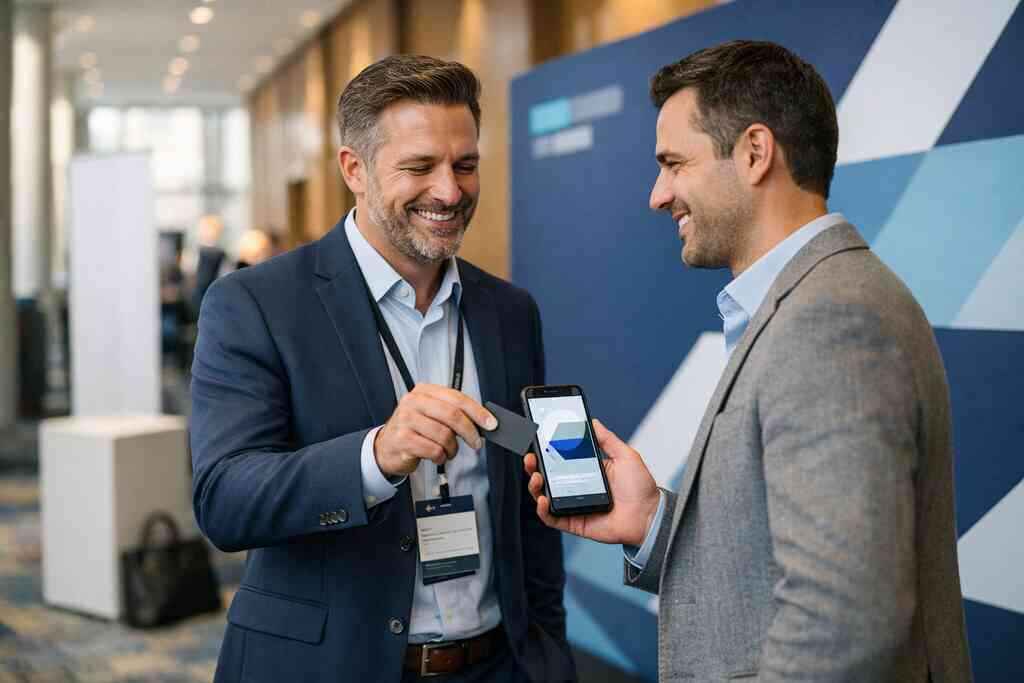
Choosing a business card template or digital business card templates that fit sales work
A business card template should support your role, not flatten it. Salespeople often need a sharper, more action-driven layout than general networking users. The same is true for digital business card templates. A real estate agent, a freelancer, and a corporate account executive will not need the same structure.
The mistake we see most often is overdesign: too many icons, too many colors, too many links. A cleaner digital business card template usually performs better because it keeps attention on the contact exchange. That is the point.
If you want examples, templates can help you compare styles without starting from zero. Look for a layout that supports your business card design and keeps the call to action visible. Then test it with real prospects before rolling it out broadly.
Why contactless sharing matters in client meetings conferences and elevator pitches
Contactless sharing is not just a convenience. It is a social advantage. In a crowded conference hallway, nobody wants a long exchange. In an elevator pitch, nobody wants to fumble with paper. A QR scan or tap keeps the moment moving.
One sales manager told us about a cold morning at a downtown event. Everyone was holding coffee, coats, and tote bags. Paper cards kept slipping through the gaps and onto the sidewalk. The team switched to a digital share routine the next week, and the room felt different. Quicker. Cleaner. Less awkward.
That is why contactless sharing matters in client meetings too. It lets you stay present instead of managing objects. It also supports electronic business card exchange in places where speed matters most. The result is a smoother handoff and a better memory of you.
Using a digital business card for LinkedIn Apple Wallet business card and Google Pay card workflows
Many people want one card that works everywhere. That is reasonable. A digital business card for LinkedIn can help you connect quickly after a meeting. An Apple Wallet business card or Google Pay card workflow may also make sharing easier in certain settings. The key is consistency.
If your card works in LinkedIn messages, mobile wallets, and a browser link, your prospects have options. That matters because no two people prefer the same follow-up channel. Some want email. Some want text. Some save everything through LinkedIn. A flexible card respects that reality.
If you want a closer look at social sharing, Digital Business Cards for LinkedIn Networking in 2026 is a smart reference. The idea is not to add channels for the sake of it. The idea is to meet the prospect where they already are.
What NYC sales teams should test before trusting any electronic business card exchange
Before you trust any electronic business card exchange, test the basics. Scan speed. Tap behavior. Mobile view. Contact save flow. If those fail, the tool fails in real life. That is true even if the dashboard looks impressive.
Use this quick test:
- Open the card on an iPhone and Android device.
- Share it in a noisy room.
- Save the contact in under ten seconds.
- Check whether the info appears clearly after saving.
- Confirm the follow-up path is obvious.
If you are comparing providers, Ultimate Guide to Digital Business Cards for Sales Teams can help frame the decision. The right tool should feel calm under pressure. NYC sales teams do not need perfect. They need reliable.
The decision map that turns a smart card into more meetings and cleaner follow up
A smart card only matters if it helps your pipeline. The real win is not the scan. It is the meeting that follows. That is why your buying decision should focus on usefulness, not hype. If the card supports follow-up, it is worth serious attention.
Which digital card features actually help sales professionals freelancers and corporate teams
The most useful digital card features are often the least glamorous. Custom branding. Easy sharing. Lead capture. Analytics. CRM connection. Those are the tools that help sales professionals, freelancers, and corporate teams work faster. Fancy animations rarely close deals.
For many teams, the practical features are enough:
- Fast share links
- QR and NFC options
- Editable contact details
- Scan tracking
- Exportable leads
- Branding control
If you want a deeper feature view, Advanced Digital Business Cards Analytics for Teams 2026 is worth a look. Good analytics do not just count clicks. They help you understand which introductions turn into actual follow-up.
When premium digital card plans make sense and when a free digital business card may be enough
A free digital business card can be enough if you are testing the concept or networking lightly. It may cover the basics without much overhead. But teams with heavier pipeline demands often need more control. That is where premium digital card plans may make sense. The decision depends on how much your team relies on follow-up structure.
Here is a useful rule. If your card is personal and simple, start small. If your card supports a team, brand standards, or lead management, look harder at upgrade options. Do not pay for features you will never use. Do not stay free if manual work is eating your time.
For a clearer view of options, Pricing & Plans is the right place to compare. Just remember to verify what is included before you decide. Pricing should fit your pipeline, not your ego.
How digital business cards near me can support Long Island networking in Suffolk County and beyond
Searches for digital business cards near me usually mean something practical. You want local support, local relevance, and a provider that understands your market. That matters in Long Island, New York, where networking often crosses into NYC and back again. It also matters in Suffolk County, where a lot of business still runs through referrals and local trust.
A good local setup helps with consistency. If your team is meeting prospects in Commack co-working spaces one day and Manhattan offices the next, the same card should work everywhere. That is why local familiarity matters. It reduces setup friction and keeps your brand steady.
If you want a local networking lens, Long Island Business Network – Networking Group can add context. The right digital setup should support how you meet people in this region. Local and mobile should work together, not compete.
What a strong next move looks like after a scan tap or share
After a scan, do not improvise. Have a next move ready. A quick email. A LinkedIn request. A calendar link. A note that reflects the actual conversation. That is how the card turns into momentum.
The strongest teams treat the share like the beginning of a sequence, not the end of an exchange. That sequence can be simple:
- Card shared
- Contact saved
- Short follow-up sent
- Meeting proposed
- Notes added to CRM
If you want a cleaner process, Lead Marketing Strategies can help shape the follow-up side. But even without extra help, you can improve this today. Choose one action and make it your default.
Why the right online business card should fit your pipeline not just your profile
An online business card should not just look good. It should fit how you sell. If you work mostly through referrals, your card should make sharing and recalling easy. If you sell to teams, it should support tracking and handoff. If you do more face-to-face networking, it should be fast and simple.
That is the real test of the best virtual business card tools. Do they help you keep the right conversations moving? Do they make your follow-up cleaner? Do they fit your day in New York, on the train, in the office, and after hours?
If you want to compare platform quality more broadly, Reviews can be helpful, but read them carefully. Look for real workflow details, not just praise. A strong card should support your pipeline with less effort, not more.
Ready to make networking easier without losing your edge? Start with one card, one clean design, and one repeatable sharing habit. If you want a practical setup from a Long Island-based team that understands sales reality, explore The Digital Business Cards. You do not need to fix everything today, and you do not need to do it alone.
Frequently Asked Questions
Question: What makes Best Virtual Business Card Tools for NYC Sales Teams 2026 different from a paper card for busy sales professionals?
Answer: The biggest difference is speed. A paper card can be misplaced, damaged, or forgotten before follow-up happens, while a digital business card lets you share contact info instantly and keep the conversation moving. For NYC sales teams, that matters because networking often happens fast, in transit, at events, or during short meetings. A virtual business card, electronic business card, or smart business card makes it easier for prospects to save your details right away, which supports better professional networking and a smoother follow-up process. It also gives you a more modern and paperless networking experience, which can be especially useful for sales professionals, real estate agents, freelancers, corporate teams, and small business owners who need a cleaner way to manage business card details.
Question: How does a digital business card app help NYC and Long Island teams share contact info more effectively?
Answer: A digital business card app is designed to make sharing simple. Instead of handing out paper, you can create digital business card details in one place and share them by QR code, link, email, or other contactless sharing methods. That makes it much easier to send your online business card in the moment, whether you are meeting someone in Manhattan, on Long Island, or anywhere in Suffolk County. The main benefit is that your contact information is easy to access and easy to save, which helps reduce friction during networking. For teams focused on lead capture and follow-up automation, that can be a major advantage because the contact exchange starts with something practical instead of a paper card that may never get entered into a phone.
Question: Should I use QR code business cards or NFC business cards for digital business cards for networking?
Answer: Both QR code business cards and NFC business cards can be useful, and the right choice depends on your audience and your workflow. QR code business cards work well because they are widely recognized and easy to scan on most phones. NFC business cards can feel even more seamless when the receiving device supports tap-to-share sharing. Many professionals use both so they are prepared in different situations. If your goal is digital business cards for networking, the most important thing is that the card is quick to access, easy to save, and clear enough to encourage follow-up. A strong digital card maker should let you choose the format that fits your sales motion while keeping the experience simple for the person receiving your card.
Question: What digital business card features should NYC sales teams look for in a platform?
Answer: NYC sales teams should look for digital business card features that support real-world networking, not just appearance. Helpful basics include custom branding, a clean digital business card design, business card templates, and easy ways to update your business card details. Teams should also consider lead capture, CRM integration, digital card analytics, and follow-up automation if those features are available and clearly supported by the platform. Those tools can help turn a scan into an organized contact and make it easier to track interest over time. If your team needs a more polished appearance, virtual card design and digital business card templates can help keep everyone consistent. The best digital business card platforms are the ones that make sharing, saving, and following up easier without adding unnecessary complexity.
Question: Can Digital Business Cards help me create digital business card options for LinkedIn, Apple Wallet business card use, or Google Pay card sharing?
Answer: Digital Business Cards is focused on helping you share and store your contact information in one place, and the best way to use that setup depends on how you network. If you want a digital business card for LinkedIn, or you want to use a browser link, QR code, or another digital sharing method, the goal is the same: make it easier for people to save your details quickly. If your workflow also includes Apple Wallet business card or Google Pay card use, that can be helpful for convenience, as long as it fits your audience and the platform supports your preferred sharing method. The key is to keep your contact exchange simple, professional, and consistent with your brand. That is especially important for digital business cards for sales professionals who rely on quick follow-up and a clear first impression.
Question: What should I know about digital card pricing, free digital business card options, and premium digital card plans before choosing a tool?
Answer: It helps to start by thinking about how often you network and what your team actually needs. A free digital business card may be enough if you are testing the idea or only need basic sharing. Premium digital card plans can make more sense if you need stronger branding, more team consistency, or more advanced support for lead capture, CRM integration, or digital card analytics. Since every platform is different, it is best to review the current digital card pricing and confirm what is included before deciding. That way you avoid paying for extras you do not need, while still leaving room to grow if your networking or sales process becomes more demanding. For Long Island, New York, and NYC teams, the best choice is usually the one that fits your workflow, supports your follow-up process, and keeps your online business card easy to use in the real world.