
-
Why does a single scan beat ten follow-up calls when the card is digital
A paper card feels simple until it disappears into a jacket pocket, a laptop sleeve, or the bottom of a conference tote. Then follow-up slows down, and the lead cools off. If you have ever left a mixer with a stack of cards and no clear next step, that frustration is real. A digital business card changes that pattern by making contact sharing immediate. The scan happens now, not later.
How a paper card gets lost before the CRM ever sees it
Paper cards depend on memory, and memory is unreliable after a busy meeting. That is why a digital card usually wins on speed. The contact moves from interest to record without the awkward “What was your email again?” moment. In the projects we have seen this year, that small delay often decides whether a lead gets nurtured or forgotten. A digital business card removes that delay.
Here is the part most people miss. The card itself is not the asset. The contact flow is the asset. When you use an electronic business card or online business card, you reduce friction at the exact moment attention is highest. That is especially helpful for sales professionals, real estate agents, and freelancers who meet people quickly and move on just as fast.
Why contactless sharing keeps momentum alive after the handshake
Momentum matters in sales. The longer the pause after the handshake, the more likely the lead goes cold. Contactless sharing keeps the conversation alive because the next step feels natural, not forced. A scan, tap, or link can happen while the other person is still engaged. That is why paperless networking feels smoother than the old card exchange.
One client at a Hauppauge business mixer had a promising conversation with a facilities manager, then realized the room got loud fast. Instead of digging for a card, they shared a virtual business card on the spot. The contact opened instantly, saved the details, and replied before the event ended. That kind of pace is hard to recreate with paper.
What sales professionals in Long Island notice when the first reply comes faster
Sales teams on Long Island, New York, deal with crowded calendars and short attention spans. A fast reply gives your outreach a better chance. That is especially true between Suffolk County and NYC, where commuters often check messages between meetings. A smart business card can shorten the time between “nice to meet you” and “let’s talk.”
We hear this from clients almost every week. They do not want more leads they cannot manage. They want cleaner handoffs. A well-built digital card maker or digital business card app supports that by making it easier to share contact info right away. If you want a practical starting point, the How It Works page shows how the process stays simple from creation to sharing.
-
How one QR code business card turns a cold lead into a warm contact
A QR code business card helps because it removes the hesitation between interest and action. The prospect does not need to type anything. They just scan and keep moving. That matters in sales, where seconds often decide whether the next conversation happens. A strong digital business card design gives them a clear reason to scan now.
Where to place the QR code so clients actually scan it
Placement matters more than people think. Put the code where the eye naturally lands. On a phone screen, the code should be obvious and uncluttered. On a printed handout or badge, it should sit near your name and role. The goal is simple: make the scan feel effortless.
A business card template with clean spacing helps here. So do digital business card templates that keep the layout readable on mobile. A messy card slows scanning because people hesitate. A clean business card design does the opposite. It invites action.
Why a digital business card design can shorten the gap between interest and action
A useful virtual card design does more than look polished. It directs attention. For example, a digital business card example with a short headline, phone number, and one clear call to action usually works better than a crowded profile. Buyers do not want a brochure. They want the fastest route to reply.
Real estate agents see this clearly. A client at an open house may be interested for only a few seconds. A digital business card for LinkedIn or mobile sharing link can capture that moment better than a paper card on a kitchen counter. If you want stronger layout ideas, the template library is the right place to start. It gives you a cleaner path to create digital business card pages that feel professional.
How digital card details reduce the back and forth that slows sales teams down
Here is what almost no online guide mentions. Most follow-up delay comes from tiny missing details. If the email is unclear, the phone number is incomplete, or the job title is vague, the next message stalls. A good digital business card keeps those business card details in one place. That means fewer follow-up questions and fewer broken threads.
A digital card maker can also help standardize what gets shared. That matters for corporate teams and small business groups that want consistent outreach. It also supports sustainable business cards, since you are not reprinting every time a title changes. If you are comparing options, the pricing page can help you understand available plan types without guessing. Just avoid assuming every plan includes the same digital business card features.
-
Why NFC business cards and tap to share can remove the waiting game
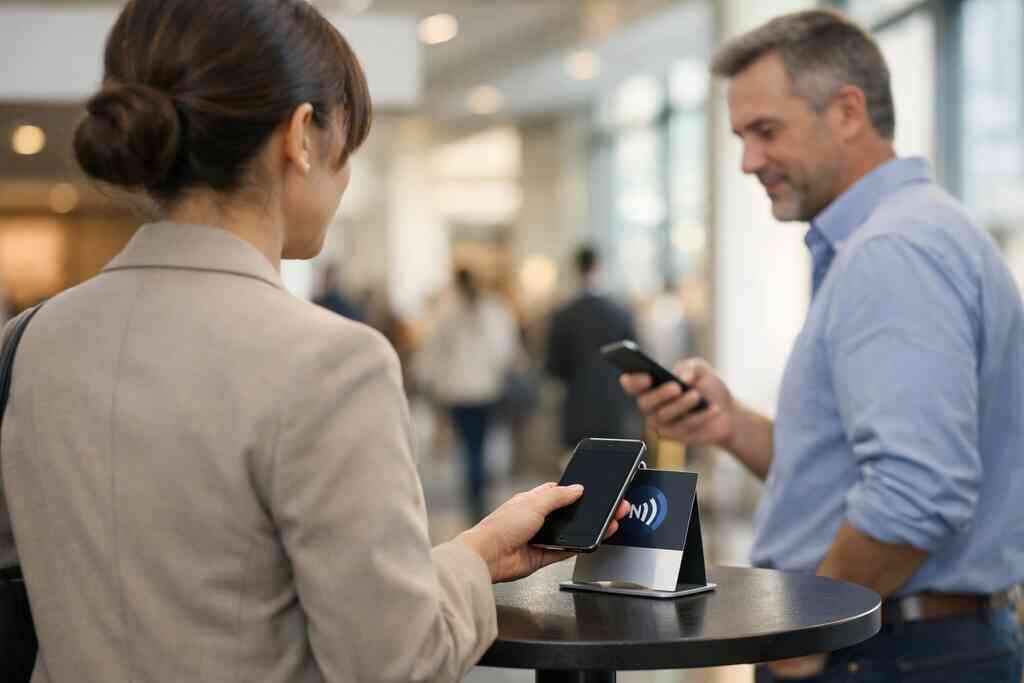
NFC business cards are built for speed. Instead of asking someone to scan, you let them tap. That feels smoother in busy rooms, especially when people already have their phone in hand. For many sellers, that small difference removes the waiting game completely. It also supports electronic business card exchange without making the interaction feel technical.
When an NFC business card makes more sense than a paper stack
An NFC business card makes sense when you meet people face to face all day. It also helps when you want a polished, modern feel. Paper stacks still work in some settings, but they cannot match tap-based sharing for immediacy. If your job depends on quick exchanges, tap-to-share is worth serious attention.
The standards matter too. NFC commonly relies on ISO 14443-style communication, which is designed for short-range data exchange. On Apple devices, Core NFC supports reading and interacting with nearby tags in compatible ways. That does not mean every setup behaves the same, so it is smart to test your card on the devices your buyers use. If you want a deeper comparison, the NFC vs QR Code Digital Business Cards: Which Wins in 2026 page is a helpful place to review the basics.
How tap sharing helps in meetings, conferences, and crowded networking rooms
Tap sharing works especially well in packed rooms. Think of a Commack co-working space, a county chamber mixer, or a crowded expo floor. People are moving. Noise is high. Nobody wants a long exchange. A tap feels clean and quick. One salesperson we spoke with had three meetings in one afternoon and no time to sort paper cards between them. They used tap sharing instead. By the time they reached their car, the contacts were already saved. That is the real value of a digital business card app paired with NFC. It saves the after-meeting scramble. ### What buyers in NYC and Suffolk County experience when they get your info instantly 
Buyers in NYC and Suffolk County are used to fast systems. They do not want to wait while you spell an email address twice. Instant sharing signals that you respect their time. It also lowers the odds of losing the connection before the first message.
There is also a privacy angle. If you store shared contact details, think carefully about consent and retention. GDPR principles are a good reminder to collect only what you need and explain how it will be used. That matters for trust. It matters even more for professional networking in regulated or larger team environments. For a balanced look at tap versus scan, the contactless sharing guide is useful.
-
How lead capture and CRM integration make the follow up happen while you are still talking
This is where the time savings become measurable. Lead capture turns a card exchange into a usable record. CRM integration moves that record into your pipeline without manual entry. That means your follow-up can begin while the conversation is still fresh. For busy sales professionals, that is a major advantage.
What information should be captured on a digital business card app
Keep it focused. A strong setup captures the essentials first. That usually includes name, company, role, phone, email, and a preferred contact method. Some teams also include notes fields for context, such as event name or product interest. The point is to make the next message relevant.
A good digital business card app also helps reduce duplicate entry. That saves time for freelancers and small business owners who do not have a sales admin in the background. If the app also supports digital card analytics, even better. You can see which contacts engaged and which ones ignored the share. That is a smarter starting point than guessing.
How follow-up automation can keep sales from slipping through the cracks
Follow-up automation is useful because it removes the weakest link: human delay. People get busy. Emails get buried. A contact who looked warm in the room can fade by morning. Automation helps send the right reminder at the right time without demanding constant manual effort.
You do not need a complicated system to benefit from this. Start by connecting your card to a simple sequence. Then let the workflow do the heavy lifting. If you want a practical overview of setup options, the Automate Follow Ups Using Digital Business Cards in 2026 page explains the concept clearly. It is especially useful for teams that want speed without losing the human touch.
Why analytics and contact tracking matter for small business teams and freelancers
Digital card analytics tell you more than who scanned. They help you see which contacts engaged, which assets got attention, and where your outreach works best. That is valuable for corporate teams and independent sellers alike. It can also improve how you use a digital business card for networking at events.
Lead capture and contact management with digital cards become even stronger when paired with tracking. You stop wasting energy on dead ends. Instead, you spend time on real opportunities. That is the difference between a busy calendar and a useful one. For teams comparing tools, the CRM integration resource and the analytics guide are worth a close look.
-
Which digital business card setup will actually save you the most time this week
The best setup is the one you will actually use in the field. Some people need a free option to get started. Others need stronger branding, more control, or team-wide consistency. The right choice depends on how often you network and how quickly you need to follow up. That is why comparing the options matters before you commit.
How to compare free digital business card options with premium digital card plans
A free digital business card can be enough for testing. It lets you learn what works without overcommitting. But if you need more control, premium digital card plans may be worth it. That can matter for teams that care about consistency, tracking, and brand presentation.
Here is a quick comparison:
OptionBest forTime savingsTradeoffFree digital cardSolo testingBasicUsually limited controlPremium planActive sellersStrongRequires a paid commitmentTeam setupCorporate useHighestNeeds rollout disciplineThe exact digital card pricing will vary, so check the current plan details before deciding. If you want a clean side-by-side view, the Pricing & Plans page is the most direct place to compare.
Where custom branding, business card templates, and virtual card design fit into a fast sales workflow
Fast sales workflows still need trust. That is where custom branding helps. If your card looks like your website, your emails, and your LinkedIn profile, people recognize you faster. A polished business card template also reduces setup time because you are not designing from scratch every time.
That matters for digital business cards for networking, especially at local events. A seller in Long Island can move from a Hauppauge mixer to a Garden City meeting without changing tools. The same card can support a digital business card for LinkedIn, a mobile share, or even an Apple Wallet business card or Google Pay card-style save flow, depending on the setup. If design is your bottleneck, the custom branding tips guide is a practical resource. It helps you move faster without looking generic.
What Long Island sales professionals should do next to create digital business card systems that move deals forward
If you sell on Long Island, New York, speed and clarity matter more than decoration. Start with one card that is easy to share and easy to save. Then test it in real settings, like a local networking group, a client lunch, or a quick referral meeting. The goal is not complexity. The goal is fewer lost leads.
One Garden City agent used a simple digital share after an open-house conversation and avoided the usual paper-card shuffle. That kind of efficiency is exactly why teams are moving toward paperless networking and electronic business card exchange. If you want a broader rollout, review the How to Create a Digital Business Card That Converts Leads guide, then build from there. You do not have to figure it all out today. Start with one card, one workflow, and one real meeting this week.
Frequently Asked Questions
Question: How do digital business cards help sales professionals cut follow-up time after networking events in Long Island, New York, NYC, or Suffolk County?
Answer: Digital business cards help sales professionals cut follow-up time by making it easier to share contact info instantly and keep the conversation moving. Instead of waiting for a paper card to be entered manually later, a digital business card, online business card, or virtual business card can be shared right away through a QR code, link, tap, or email. That faster exchange supports paperless networking and reduces the chance that a lead gets lost before follow-up begins. For people meeting prospects in Long Island, New York, NYC, or Suffolk County, that speed can make a real difference because attention often fades quickly after the first conversation. A digital card also helps keep business card details organized in one place, which can make the next message easier to send and more relevant.
Question: What makes QR code business cards and NFC business cards useful for the blog topic Best 5 Ways Digital Business Cards Cut Follow Up Time for Sales?
Answer: QR code business cards and NFC business cards are useful because they shorten the gap between meeting someone and getting your contact into their phone. A QR code business card lets the other person scan and save your details without typing, while NFC business cards allow tap to share in compatible settings. Both options support contactless sharing, which is especially helpful in busy networking rooms, conferences, open houses, and client meetings. For sales professionals, real estate agents, freelancers, and corporate teams, that immediate exchange can make follow-up feel smoother and more natural. If someone is asking how to make a digital business card or create digital business card pages that are practical, these formats are a strong starting point because they focus on speed and convenience.
Question: Does Digital Business Cards support lead capture, CRM integration, and follow-up automation for a digital business card app?
Answer: Digital Business Cards is built around the idea that sharing contact info should be simple and useful for follow-up, so lead capture and CRM integration are natural topics to consider when using a digital business card app. The blog content highlights how capturing contact details quickly can reduce manual entry and help sales teams respond sooner. Follow-up automation can also help keep leads from slipping through the cracks by sending reminders or next steps after the card is shared. While specific app functionality should always be checked on the website, the overall workflow is clear: share the card, capture the lead, and make the follow-up process easier to manage. That is especially valuable for small business owners, corporate teams, and freelancers who need efficient systems without extra administrative work.
Question: What should I look for in digital business card design, business card templates, and custom branding if I want faster sales follow up?
Answer: If faster follow-up is the goal, look for a clean digital business card design that makes your contact details easy to read and your call to action easy to understand. Good business card templates and digital business card templates should avoid clutter and keep the most important business card details visible at a glance. Custom branding matters too, because a card that matches your website, email, and professional presence feels more trustworthy and easier to remember. A well-structured virtual card design can also help direct people toward the next step, whether that is calling, emailing, or connecting on LinkedIn through a digital business card for LinkedIn. For sales professionals and real estate agents, this can reduce hesitation and make the follow-up path clearer. A polished design does not just look professional; it helps people act faster.
Question: In the blog Best 5 Ways Digital Business Cards Cut Follow Up Time for Sales, how do free digital business card options compare with premium digital card plans?
Answer: The right choice depends on how you plan to use your card and how often you need to follow up quickly. A free digital business card can be a good way to start if you want to test the idea of paperless networking or see how people respond to an online business card. Premium digital card plans may be a better fit if you need more control, stronger branding, or support for team use. For corporate teams, small business owners, and active sales professionals, premium options may offer a more scalable way to manage digital business cards for networking. It is important to review current digital card pricing and the available digital business card features before deciding, since exact plans and capabilities should always be confirmed on the website. The best digital business card platforms are usually the ones that fit your actual workflow, not just your first impression.
Question: Can a digital card vs paper really make a difference for professional networking and electronic business card exchange on Long Island?
Answer: Yes, a digital card vs paper can make a meaningful difference because digital sharing removes delays that often happen after a meeting. With paper, the card can get misplaced, entered late, or forgotten. With electronic business card exchange, the contact can be saved immediately through a QR code, link, tap, or mobile share, which keeps the conversation fresh. That matters in professional networking across Long Island, New York, Suffolk County, and NYC, where people often move quickly between meetings and events. A digital business card, smart business card, or virtual business card also supports sustainable business cards by reducing the need for repeated printing. For anyone comparing business card example options, digital formats usually offer a more efficient path to follow up while still keeping the exchange personal and professional.