

Why a paper card gets ignored before the email even lands
If you have ever handed out a paper card and heard nothing back, that sting is real. The card probably did its job for five seconds. Then it landed in a pocket, a tote, or a desk drawer. That is where follow-up ROI starts leaking.
A paper card creates friction before your email even has a chance. People misplace it, smudge it, or forget which stack it came from. That delay matters. Every extra step lowers the odds of a reply.
We hear this from professionals across Long Island, New York, especially after busy events and client meetings. A handshake at a Hauppauge mixer can feel promising. Yet the contact often gets buried before lunch. That is why paperless networking keeps gaining ground.
The hidden cost of lost contacts at conferences and client meetings
The cost is not just the card. It is the lost context. At a conference, the person remembers your conversation for a short window, then the memory fades. If your follow-up arrives late, the email feels cold instead of relevant.
On the projects and networking audits we have seen, the same pattern repeats. Someone collects twenty cards, then enters only six contacts later. The rest never make it into the pipeline. That is not a branding problem. It is a contact capture problem.
A better system keeps the lead alive while the conversation is still warm. That is where digital business cards help. They let you share contact info instantly, which protects the handoff between meeting and message. For sales professionals, that small timing change can reshape the whole sales follow-up strategy.
Why a smudged paper card slows down follow-up more than most people realize
A paper card can fail in boring ways. Ink blurs. A corner bends. A phone number is hard to read under dim event lighting. Those tiny failures create hesitation, and hesitation hurts email response optimization.
Here is the part most people miss. When a contact has to decode your card, they postpone action. Postponed action becomes forgotten action. A clean digital business card avoids that moment completely.
One freelancer in a Commack co-working space told us she kept receiving “great to meet you” replies, but very few booked calls. Her paper cards looked polished, yet her contact details were inconsistent across channels. After she switched to an online business card, she reduced that confusion and made the next email easier to connect back to the meeting.
How Long Island professionals lose momentum between the handshake and the inbox
Long Island professionals juggle a lot. You might leave a Garden City meeting, hop on the LIRR, and answer emails before you even sit down. That pace leaves little room for manual contact management workflow. If the lead is not captured immediately, the momentum disappears.
This is especially true for anyone doing NYC professional networking while based in Suffolk County. You may meet someone in Manhattan, then return to Long Island before drafting a follow-up. In that gap, paper cards get shuffled, and the best introductions lose urgency. A virtual business card keeps the connection ready for the inbox.
What actually makes a digital business card improve email follow up ROI
Digital business cards improve email follow up ROI because they reduce delay, reduce errors, and improve lead capture. They move the contact exchange closer to the conversation itself. They also support digital card analytics, which helps you see which introductions deserve faster follow-up. That combination makes email outreach sharper and more efficient.
The difference is simple. Paper records contact details after the meeting. A digital business card can capture them during the meeting. That is why the digital card vs paper conversation is really about speed, accuracy, and conversion-focused follow-up.
How contactless sharing shortens the gap between meeting someone and capturing the lead
Contactless sharing removes a major bottleneck. Instead of waiting to type in a name later, the person can scan, tap, or open your digital card immediately. That is useful in crowded venues, client lobbies, and open networking rooms. It also supports electronic business card exchange without awkward delays.
If you want a simple explanation, this is it. The shorter the gap, the higher the reply rate. That principle is especially useful for digital business cards for follow-up ROI because the contact stays in motion. In practical terms, you are building a better bridge between introduction and email.
A 2023 Adobe survey found many professionals had lost a paper card before following up. Even without obsessing over one statistic, the pattern is believable. People are busy. Cards vanish. Digital sharing reduces that waste and supports better lead nurturing.
Why digital card analytics help you see which contacts deserve faster follow-up
Not every contact deserves the same response speed. Some people scan your card and browse casually. Others click through your details, save your contact, and revisit your profile. Digital card analytics can help you separate those signals.
That matters because email engagement tracking works best when you know who is warm. A prospect who opened your card twice may deserve a same-day note. A casual browser may only need a light nurture email. Without analytics, you are guessing.
Here is the practical benefit: you stop treating every lead the same. That saves time and improves networking lead conversion. It also makes your sales pipeline efficiency better, because your energy goes where the interest already is. For teams that care about lead quality, tracking follow up ROI becomes more than a nice extra.
How CRM integration turns a shared card into a cleaner sales pipeline
CRM integration is where the real operational value shows up. A shared card can become a structured contact record instead of a loose phone number in someone’s notes app. That means fewer duplicates, better tagging, and cleaner routing for follow-up automation.
This is particularly helpful for small business lead generation. If you meet ten prospects in a day, you do not want ten different versions of the same person in your system. You want one clean record, with the source and context preserved. That is the difference between a busy inbox and a usable pipeline.
On Long Island, this matters for teams that split time between local meetings and NYC trips. A cleaner handoff means less retyping later. It also means your follow-up email can reference the exact interaction, which feels more personal and more credible. For teams ready to tighten that process, CRM integration is worth studying.
The follow-up stack that turns a virtual business card into revenue
A virtual business card is not just a replacement for paper. It is the front end of a follow-up system. When you pair QR code business cards, NFC business cards, branding, and smart routing, you create a smoother path from introduction to reply. That is where revenue starts to improve.
The mistake we see most often is treating the card as the finish line. It is not. It is the opening move. Strong digital business card features support the rest of the sales follow-up strategy, from first contact to booked conversation.
Using QR code business cards and NFC business cards for faster contact exchange
QR code business cards work well in fast-moving environments. A scan takes little effort, and ISO/IEC 18004 keeps the format widely recognized. NFC business cards are even faster in some settings, because a tap can open the card immediately. Both reduce the lag that hurts email follow up ROI. Apple’s Core NFC framework also helps explain why tap-to-share feels so natural on supported devices. The experience is simple. Tap, open, save. That simplicity matters when you are networking under pressure. It cuts the chance that the contact will forget you before they reach their inbox. 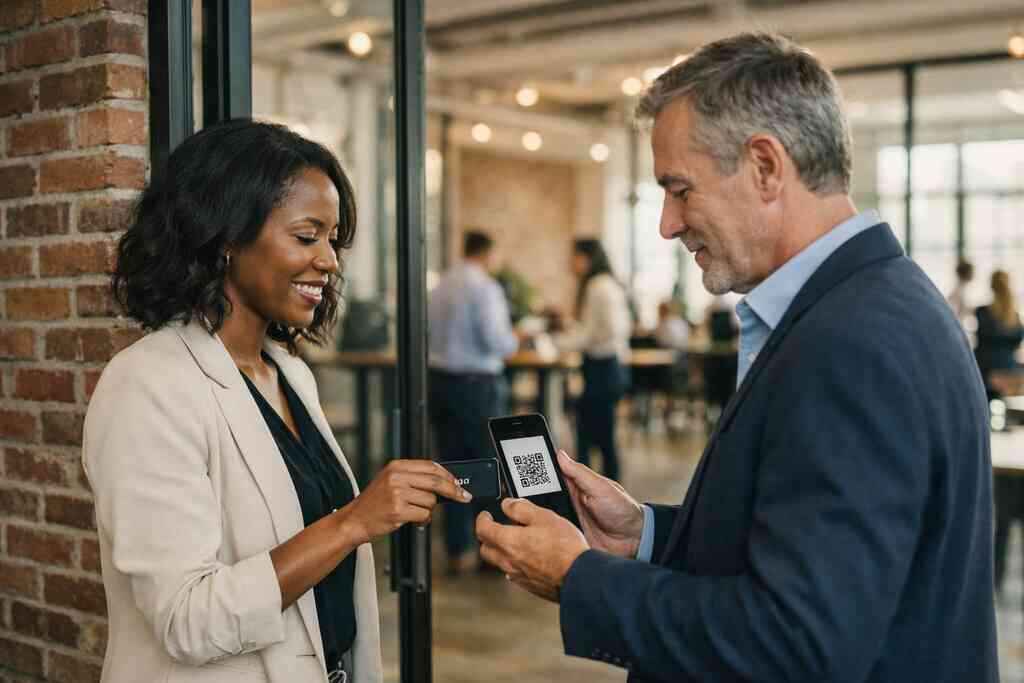
FormatBest useMain advantageQR code business cardsEvents, booths, quick introductionsEasy scanning, broad device compatibilityNFC business cardsIn-person meetings, premium networkingVery fast tap-to-share exchangePaper cardBackup onlyFamiliar, but easy to loseIf you want a deeper comparison, QR and NFC business cards each fit different workflows. The best choice depends on how you meet people. Some teams use both for flexibility.
Why digital card templates and custom branding make replies feel more personal
Templates are not just about looks. They create consistency. A clean business card template helps people recognize your brand when your follow-up email arrives. That recognition lowers resistance and makes the message feel intentional.
Custom branding matters because it reduces the feeling of a mass send. A thoughtfully designed digital business card design can mirror your website, your LinkedIn presence, and your email signature. That continuity helps the contact remember who you are.
A real estate agent in Garden City once told us her paper cards looked fine, but her follow-up emails felt disconnected. She moved to a digital card template that matched her branding colors and listing style. After that, her outreach felt more coherent, and her replies became easier to start. That is the power of aligned design and business card details.
How sales professionals real estate agents freelancers and corporate teams use digital business cards for networking
Different professionals use digital business cards in different ways. Sales professionals want speed and tracking. Real estate agents want polished presentation and mobile sharing. Freelancers want easy contact sharing without carrying stacks of paper. Corporate teams want consistency across departments.
This is where digital business cards for networking become practical, not abstract. A sales rep can send a card after a trade show. A freelancer can share one link during a discovery call. A corporate team can standardize how contacts enter the pipeline. All of that supports professional networking and better email response timing.
If you work in property or client-facing services, real estate digital card examples can show how that looks in the field. The exact format may vary, but the goal stays the same. Make the follow-up easier than ignoring you.
When a digital business card for LinkedIn Apple Wallet business card or Google Pay card fits the workflow
Sometimes the best workflow is the simplest one. A digital business card for LinkedIn fits people who already live in that ecosystem. Apple Wallet business card support is useful when contacts keep everything in one place. Google Pay card placement can work well for Android-heavy audiences.
These options are not about novelty. They are about reducing friction. If someone can save your details where they already check information, you improve the odds of a reply. That is especially useful for busy NYC commuters who want less clutter on their phones.
For teams that care about local lead follow-up, portability matters. A contact should not need to hunt for your number later. They should already have it. That is why how digital business cards work deserves a close look before you choose a format.
What to do next when you want better replies from every introduction
Better replies do not come from sending more emails alone. They come from better timing, better data, and better contact capture. If your current process depends on memory, you are leaving money on the table. That is true for small business owners, enterprise teams, and solo operators alike.
What works is a system that supports the whole handoff. A lead scans, saves, and receives a follow-up that feels connected to the conversation. That is the real value of a digital card maker. It helps your outreach start with context, not confusion.
How to make a digital business card that supports follow-up automation without friction
If you want to create digital business card workflows that actually help, keep the setup simple. Start with clean business card details. Add a clear call to action. Then make sure the contact can save you quickly.
A practical setup usually includes:
- A readable name and title
- One primary contact method
- A clear brand image or logo
- A simple path to save or share
- A follow-up process that starts immediately
That is the heart of how to make a digital business card useful. You are not designing for decoration. You are designing for action. If you want to see the setup path, onboarding and setup can clarify the workflow.
When to compare free digital business card options with premium digital card plans
A free digital business card can be enough for basic sharing. That may be fine if you only need a simple online business card. But premium digital card plans may matter if your workflow depends on analytics, branding, or team coordination. The right choice depends on your follow-up needs, not just your budget.
OptionBest forTradeoffFree digital business cardBasic sharing and testingLimited control or advanced workflow supportPremium digital card plansTeams, branding, tracking, and lead captureHigher commitment, but more structureIf you are comparing digital card pricing, focus on return, not labels. A slightly better workflow can save hours each month. That is why pricing and plans should be reviewed against your actual sales process. Cheap tools are expensive when they slow replies.
Why Long Island teams in Suffolk County and NYC should align design lead capture and response timing
Long Island teams often work across neighborhoods and city lines. A rep may take meetings in Suffolk County, then finish the day in Midtown. That makes alignment important. If your design, lead capture, and response timing do not match, the lead cools off fast.
The local reality is simple. People move quickly here. They expect speed, clarity, and professionalism. In Long Island networking, that means your virtual card should load fast, look clean, and connect to a usable follow-up sequence. That is true whether you are at a Commack co-working space or a downtown Manhattan breakfast event.
Here is the best habit we have seen in 2026. Send the email while the meeting is still fresh. Reference one concrete detail from the conversation. Then keep the card and CRM record aligned so nothing gets lost.
How to choose the best digital business card platform for professional networking and local lead follow-up
The best digital business card platforms are the ones that fit your real workflow. Look for simple sharing, clean design, and useful contact management workflow support. If lead capture and response timing matter, make sure the platform can support those goals. If you need team consistency, ask about branding and administrative control.
You should also weigh practical details. Does the platform suit your sales follow-up strategy? Can it support professional networking across devices? Can your team use it without a long learning curve? Those questions matter more than buzzwords.
If you want a local, practical option, contact the Digital Business Cards team and compare your use case against the tools you already use. You do not have to figure this out alone, and you do not have to do it all today. Start by reviewing one recent contact list and replacing the worst paper-card entry with a digital version.
Frequently Asked Questions
Question: What makes digital business cards better than a paper card for improving email follow up ROI?
Answer: Digital business cards improve email follow up ROI by reducing the delay between meeting someone and capturing their contact details. With paper cards, people often misplace the card, forget to save it, or enter the information later when the conversation is no longer fresh. A digital business card, on the other hand, supports contactless sharing, instant lead capture, and a cleaner handoff into your sales follow-up strategy. That means your follow-up email can arrive while the interaction is still top of mind, which usually leads to better response timing and stronger professional networking results. For Long Island, New York professionals who move between Suffolk County, NYC, and local meetings, that speed can make a real difference.
Question: How does Why Digital Business Cards Improve Email Follow Up ROI connect to CRM integration and follow-up automation?
Answer: The main idea behind Why Digital Business Cards Improve Email Follow Up ROI is that better contact capture leads to better follow-up. When a digital business card is connected to CRM integration, each new contact can move into a more organized contact management workflow instead of sitting in a notes app or inbox. That makes follow-up automation easier to manage, especially for sales professionals, real estate agents, freelancers, and corporate teams. Instead of guessing which lead is worth a fast response, you can use digital card analytics and lead capture signals to help prioritize outreach. This creates a more efficient pipeline and supports email engagement tracking without adding extra manual work.
Question: What digital business card features should I look for if I want better professional networking and lead capture?
Answer: If your goal is stronger professional networking and better lead capture, look for digital business card features that make sharing simple and follow-up easy. A good setup should support QR code business cards, NFC business cards, and easy share contact info options so people can save your details without friction. It should also offer custom branding, business card template options, and digital business card design flexibility so your card feels consistent with your brand. For teams, CRM integration and digital card analytics are especially helpful because they make it easier to track engagement and improve networking lead conversion. Whether you are a small business owner or part of a larger corporate team, the best digital business card platforms are the ones that support real workflow needs, not just appearance.
Question: How do QR code business cards and NFC business cards support paperless networking in Long Island and NYC?
Answer: QR code business cards and NFC business cards are both effective tools for paperless networking because they let people exchange details quickly in busy environments. In Long Island, New York, that can be especially useful at local meetings, client visits, and NYC professional networking events where people do not have time to sort through paper cards later. QR code business cards work well when someone wants a simple scan-and-save experience, while NFC business cards can make sharing feel even more immediate on supported devices. Both help reduce the risk of lost contacts and make it easier to keep your digital card vs paper process focused on speed and convenience. That is especially valuable for anyone trying to create a smoother follow-up process across Suffolk County and the wider NYC area.
Question: Can a free digital business card still help, or should I consider premium digital card plans for follow-up automation?
Answer: A free digital business card can be a useful starting point if you mainly need a simple online business card or virtual business card for basic sharing. But if your follow-up process depends on branding, analytics, or team coordination, premium digital card plans may be worth exploring. The right choice depends on how important contact capture, custom branding, and CRM integration are to your workflow. For example, a sales professional or small business may benefit from more structure, while a freelancer may only need a clean digital card maker setup to get started. If you are comparing digital card pricing, it helps to think about the time saved and the quality of follow-up, not just the initial cost. Digital Business Cards is based in Long Island, New York, so it is a practical option for teams that want a local understanding of how professional networking works in both Suffolk County and NYC.