

A networking card should not vanish in a coat pocket before your next follow-up. That happens more often than people admit, and it is frustrating when you need that contact to stick. If you are reading this because leads keep slipping through the cracks, that frustration makes sense. Local visibility depends on more than a good handshake now. It depends on whether your details stay consistent after the conversation ends.
Why your paper card disappears before Google ever notices you
The Long Island networking moment where a contact gets lost in the shuffle
Picture a Hauppauge business mixer after a long workday. People are balancing coffee, laptop bags, and a stack of cards with smudged ink. Someone means to follow up, then the card lands in a jacket pocket and gets forgotten. That moment is small, but it is expensive. On Long Island, where referrals move fast, a lost card often means a lost local search signal too.
We hear this from professionals all the time. The problem is not just memory. It is the gap between offline networking and online discoverability. A digital business card closes that gap by letting people save your details instantly. That matters when your business depends on being found again, not just remembered once.
Why stale paper cards weaken local search visibility for small businesses
Paper cards age badly. Job titles change, phone numbers shift, and office locations move across Suffolk County or into NYC. Then your old card keeps circulating with outdated business card details. Search engines notice consistency across the web, not a stack of outdated print runs. If your name, title, and location differ from page to page, local trust gets weaker.
Here is the part most business owners miss. Local SEO in Long Island rewards stable signals. When your contact data matches your website, Google Business Profile, and social pages, your business looks more established. A paper card cannot update itself. A virtual business card can keep pace with the facts people search for.
A small marketing firm in Commack once told us their biggest headache was version control. Their team had three card designs floating around after a title change. One prospect called the wrong extension, then bounced. That kind of friction does not just hurt follow-up. It can confuse your local presence across search results, directories, and email signatures.
How a digital business card keeps your name, title, and location consistent across touchpoints
A digital business card gives you one living source for contact information. That is why it works so well for paperless networking and sustainable business cards. When your details change, you update one page instead of reprinting every card. Your audience sees the same name, role, and location across devices. That consistency supports local search visibility and professional credibility at the same time.
For Long Island, New York businesses, this matters in practical ways. A realtor in Garden City may meet a buyer in person, share an online business card, and later send the same profile from email. The experience feels seamless because the details never drift. If you want to keep your business card design aligned with your online profile, use a single digital card template or a custom layout from a digital business card template library. That simple move reduces confusion and strengthens recall.
What Google reads between the lines when your contact info is everywhere at once
How consistent business card details support local SEO in Long Island and Suffolk County
Google does not read your card like a person does. It reads patterns. If your website, business card example, profile pages, and directory listings all match, that pattern builds confidence. Consistent NAP data, which means name, address, and phone, still matters for local SEO in Long Island and Suffolk County. It is boring work, but boring work often wins searches.
Think of it this way. A virtual business card is not just a sharing tool. It is a signal consistency tool. The more your business card details match your Google Business Profile and website footer, the cleaner your local footprint becomes. For businesses serving both Long Island and NYC commuters, that consistency can be especially important.
Why a virtual business card can reinforce your Google Business Profile signals
Your Google Business Profile optimization gets stronger when external touchpoints agree with it. A digital card can reinforce your location, category, service area, and contact method without forcing someone to hunt for info. That helps people move from curiosity to action quickly. It also reduces the chance they click away to verify basic facts.
Here is an example from a consultant who works near the Huntington area. She kept changing her voicemail, website footer, and printed card during a move. Prospects kept asking the same question: “Which address should I trust?” Once she used one digital business card app profile, the confusion dropped fast. The online and offline story finally matched.
If you want a more structured setup, review the How It Works flow before building. The process of creating, sharing, and updating one card supports cleaner local SEO signals. It also helps you avoid scattered contact data that weakens trust. That matters more than most people realize.
The role of share contact info links in building trust across websites, social profiles, and email signatures
A share contact info link does more than replace paper. It creates a bridge between your website, LinkedIn, email signature, and social profiles. That bridge helps people verify you fast. It also keeps your digital business cards for networking consistent wherever they appear. Trust often rises when the same phone number, job title, and service area repeat naturally.
This is also where CRM integration and lead capture begin to matter. If someone taps your online business card from an email signature, the path should feel smooth. If they later find your profile on LinkedIn, the same details should greet them. That kind of repetition can support electronic business card exchange without extra effort. It is simple, and simple often converts better.
Why digital business cards near me matters when nearby intent is the goal
Searchers often type “digital business cards near me” because they want something local and immediate. That phrase reflects nearby intent, not casual browsing. If your Long Island business serves walk-in meetings, local events, or commuter-heavy sales routes, proximity matters. Your digital card should make your service area obvious. It should not hide the fact that you are nearby.
That is especially true for businesses in Suffolk County and the Nassau border towns. A nearby prospect may compare three options in two minutes. If your contact page, card profile, and website all reinforce the same local positioning, you are easier to choose. That is local SEO in plain language. Relevance plus clarity usually beats noise.
The hidden mechanics that turn a digital card into a local ranking asset
How QR code business cards and NFC business cards make contactless networking easier at events
At a crowded event, speed matters. QR code business cards let someone scan and save your details in seconds. NFC business cards make the exchange even faster when a tap works better than typing. Both formats support contactless networking, which is now normal at mixers, conferences, and client meetings. The smoother the exchange, the less likely your lead gets lost.
The technology is straightforward. QR codes follow the ISO/IEC 18004 standard, and NFC commonly relies on ISO 14443 data exchange. Apple’s Core NFC framework also shows how tap-to-share can work reliably on compatible devices. If you are comparing options, check our NFC vs QR Code Digital Business Cards: Which Wins in 2026 page for a practical overview. That can help you decide which format fits your daily networking habits.
For example, a business development rep at a Commack co-working event may not want to fumble through a paper stack. A quick scan is cleaner. It also feels more modern without being flashy. That matters when first impressions are tied to professional networking and local recall.
Why digital card analytics and lead capture matter for follow-up automation
A strong digital card does more than share contact info instantly. It helps you understand what happened after the scan. Digital card analytics can show which links drew attention and which profiles got opened. Lead capture matters because it turns a brief encounter into a follow-up opportunity. Without that, you are guessing.
Here is where the value becomes real. A digital business card app can support follow-up automation by making lead collection easier to organize. If someone scans your card after a trade show, you want that interest recorded. You do not want to rely on memory after a long day. If you want a deeper look at tracking, review How Digital Business Cards Use Analytics to Track Follow Up ROI. That can help you measure what your networking actually produces.
How CRM integration can help local professionals keep leads from slipping away
CRM integration matters because great leads die in messy systems. A good card should connect to the tools you already use. That may include a sales pipeline, a contact list, or a follow-up sequence. When a card flow matches your CRM, your team spends less time copying and pasting. That saves effort and reduces mistakes. We see this often with sales professionals and corporate teams. Someone meets a prospect, then waits until the next day to enter the lead. By then, details blur. A digital card that supports a clean handoff into a CRM keeps momentum alive. If you are comparing setup options, look at Pricing & Plans only after you know what your workflow needs. That keeps the decision practical, not emotional. 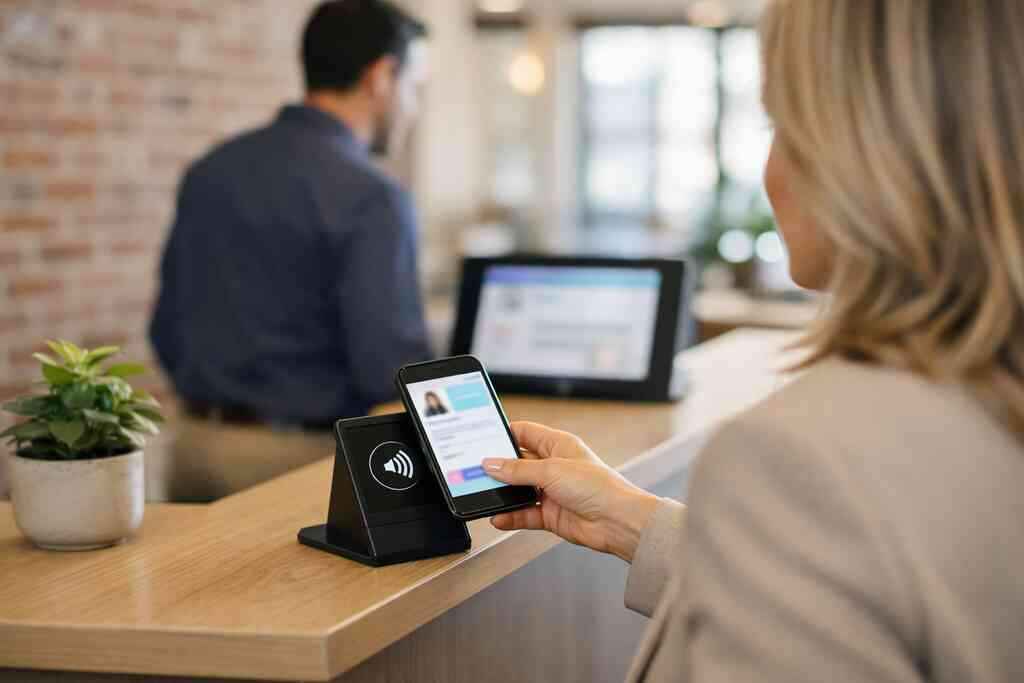
Why custom branding and digital business card design influence click-through and recall
Design affects memory more than people expect. A clean digital business card design helps prospects recognize you later. Custom branding also makes your card feel connected to your website, not detached from it. That visual consistency can improve click-through because people trust what looks familiar. It is not decoration. It is recognition.
A smart business card should read clearly on a phone screen. Keep the layout simple. Use one strong headline, one clear call to action, and a readable profile image if you include one. The best digital business card platforms usually support this kind of visual discipline. If your card looks cluttered, the message gets weaker. If it looks clean, people act faster.
When to use a business card template versus a fully custom digital card maker workflow
A business card template works well when speed matters. It gives you structure without delaying launch. A fully custom digital card maker workflow makes more sense when branding is central to your business. That is especially true for agencies, real estate agents, and client-facing firms. The right choice depends on how often you present, how polished you need to look, and how much control you want.
Here is a simple comparison:
OptionBest forStrengthTradeoffBusiness card templateFast setupSaves timeLess uniqueDigital business card templatesTeams and repeat useEasy brand consistencyMay need light editingFully custom digital card makerPremium brandingMaximum controlMore setup timeIf you are unsure, start with a template and refine later. That is often the safest path for small business owners who need momentum. A good structure beats a perfect delay.
The next move for Long Island businesses that want more than a nicer card
When a free digital business card makes sense and when premium digital card plans are worth a look
A free digital business card can be enough for simple networking. If you mainly need one profile, one QR code, and a fast share option, free may fit. Premium digital card plans make more sense when branding, team use, or analytics matter. The deciding factor is not price alone. It is how much the card supports your real workflow.
If you are a solo freelancer, a basic setup may be enough to start. If you manage a corporate team or handle frequent client touchpoints, extra control can matter. Some businesses need more room for branding, links, and reporting. Before choosing, compare your actual use cases. That is more useful than guessing.
How to create digital business card pages that fit sales professionals, real estate agents, freelancers, and corporate teams
Different professionals need different card structures. Sales professionals often want fast lead capture and a clear booking link. Real estate agents may need listing links, service areas, and fast sharing for open houses. Freelancers may want a lean profile with portfolio links. Corporate teams often need brand consistency across many people.
A strong Create Digital Business Card flow should support those differences without making setup painful. Keep the page focused. Include only the business card details people actually need. A digital card for LinkedIn should feel professional, not overloaded. If you work in real estate, you can also compare Best Digital Business Cards for Long Island Real Estate Pros for a more targeted approach. That can save time and reduce guesswork.
Why digital card vs paper is also a local marketing decision for Long Island, New York and NYC commuters
The digital card vs paper debate is not just about convenience. It is also about how people move through Long Island, New York, and into NYC. Commuters do not want to carry bulky stacks of paper after a train ride or a client day in Manhattan. They want contactless sharing that works fast. That makes digital business cards for networking a better fit for many modern routines.
The local angle matters because people meet in varied places. A prospect may see you in a Garden City office, a Suffolk County event, or a Midtown meeting. A digital card travels with you. Paper cards do not. If your audience is mobile, your networking tool should be too.
How to pair your digital business card with LinkedIn, Apple Wallet business card, and Google Pay card sharing
LinkedIn works well for professional follow-up. An Apple Wallet business card can keep your details close on iPhone screens. Google Pay card sharing can also support quick access on compatible devices. Together, these options make your digital business card feel present across daily workflows. That is useful when people forget where they saved a contact.
Be careful with data handling, though. GDPR considerations still matter if you store shared contact details from international contacts. Keep consent and privacy in mind, especially if your outreach crosses regions. If you want a broader learning path, the Blog can help you refine your approach. It is a smart place to keep learning without guessing.
What to check on /how-it-works/ and /templates/ before you build your own digital card
Before you build, check the basics. Look at how setup works, how sharing works, and how templates support your brand. Confirm that the flow fits your device habits and your team needs. If the card is hard to update, it will not stay useful. Simplicity is the real test.
Also, review how the design handles mobile screens. A smart card should be easy to scan, easy to save, and easy to read. That is the standard for paperless networking now. If you are ready to compare structure and style, start with the How It Works page and then explore Pricing & Plans. You do not need to figure everything out today. You just need a cleaner system for the next conversation.
Frequently Asked Questions
Question: How do digital business cards improve local SEO in Long Island for small businesses?
Answer: Digital business cards help improve local SEO in Long Island by keeping your business card details consistent across the places people look for you online. When your name, phone number, title, website, and service area match your Google Business Profile, website footer, email signature, and social profiles, search engines can more easily recognize your business as legitimate and local. That consistency supports Long Island local search visibility and can make it easier for nearby prospects in Suffolk County, Nassau County, and NYC to find and trust you. A digital business card also makes it simpler to share contact info instantly after networking events, which helps your brand stay visible after the conversation ends.
Question: What makes How Digital Business Cards Improve Local SEO in Long Island relevant to Google Business Profile optimization?
Answer: The blog How Digital Business Cards Improve Local SEO in Long Island is relevant because it explains how a virtual business card can reinforce the same business information that appears in your Google Business Profile. Search engines pay attention to pattern consistency, so when your online business card, website, and profile all show the same location-based details, it supports stronger local signals. That is especially useful for Long Island, New York businesses that serve both local clients and NYC commuters. Using a digital business card app also makes updates easier, so if your phone number, role, or office location changes, you can revise one source instead of reprinting paper cards or leaving outdated business card details scattered across the web.
Question: Can QR code business cards and NFC business cards help with contactless networking and lead capture?
Answer: Yes. QR code business cards and NFC business cards are both strong tools for contactless networking because they let people save your information quickly without handling paper. In a busy networking setting, that speed can make a real difference. Instead of relying on a business card example that may get lost in a pocket, a smart business card can direct someone straight to your profile, website, or contact page. For local marketing, that convenience helps with lead capture and can support follow-up automation when your digital card analytics are connected to a CRM integration workflow. The result is a smoother path from first meeting to next step, which is especially useful for sales professionals, real estate agents, freelancers, and corporate teams.
Question: Should I use a business card template or a custom digital card maker for my Long Island brand?
Answer: The right choice depends on how much control you want over your digital business card design and how quickly you need to launch. A business card template or digital business card templates can be a smart starting point if you want a simple setup that still looks polished. A digital card maker with custom branding may be a better fit if your business depends on a stronger visual identity, such as a real estate office, agency, or client-facing professional service. For Long Island businesses, the goal is usually to keep the card clean, mobile-friendly, and easy to update. That way, your virtual card design supports both professional networking and local SEO without creating extra work.
Question: What should I check before I create digital business card pages for networking in Suffolk County or NYC?
Answer: Before you create digital business card pages, check whether the layout is simple, mobile-friendly, and easy to share through a link, QR code, email, or digital business card for LinkedIn use. Make sure your business card details are accurate and consistent with the rest of your online presence, especially if you work across Suffolk County and NYC. It is also smart to review how the setup process works and whether the design supports your daily workflow. If you need paperless networking, sustainable business cards, or a professional online business card for small business use, the page should make it easy to share contact info instantly without confusion. If you are comparing digital card pricing, free digital business card options, or premium digital card plans, focus on the workflow first so you choose the setup that actually fits your business.