

Why paper cards still vanish at the worst possible moment for a small business owner
A smudged paper card can ruin a good introduction in seconds. You shake hands, smile, and promise a follow-up. Then the card disappears into a jacket pocket, a damp tote, or a pile on your desk. If that sounds familiar, take a breath. This frustration is common, and it is fixable.
The networking moment when a smudged paper card costs the follow-up
Here is the part most people miss: the card itself is rarely the problem. The problem is what happens after the handshake. Ink fades, corners bend, and names get separated from context. You may remember the conversation, but not the email address. That is how a promising lead slips away.
A small business owner once told us about a rainy networking lunch near Huntington. Their paper card got damp before they reached the car. By the time they got home, the phone number looked like a blur. That is a tiny mistake with a big cost. The meeting happened, but the follow-up never did. It should not be that fragile.
What a digital business card changes when your contact lives in one place
A digital business card keeps your business card details in one place. That means your contact info, links, and branding travel together. No more losing the right phone number under a stack of receipts. No more reprinting after a title change. And no more guessing which version you handed out.
That shift matters because small business networking moves fast. With a digital business card company overview and brand story, your contact can live behind one shareable link or code. The person who meets you can save it right away. You can also update details without replacing a box of printed cards. For a busy owner, that simplicity is the real win.
Why Long Island, New York professionals are making the switch before the next mixer
On Long Island, New York, networking often happens between errands, client meetings, and commuter schedules. You might meet someone at a Hauppauge business mixer, then catch a train into NYC the next morning. In that rhythm, paper cards feel slow. Digital business cards fit the pace better. They also fit the reality of modern follow-up.
We hear this from people in Suffolk County all the time. They do not want another thing to carry. They want a clean way to share contact info without digging through a card holder. That is why digital business cards for networking keep gaining ground. They reduce clutter, save time, and make the next conversation easier to start.
What a digital business card really is and why the format matters more than the file
A digital business card is not just a file. It is a living version of your professional identity. Think of it as an online business card, a virtual business card, or an electronic business card that can be shared instantly. The format matters because people act on what is easy to save. If saving your contact takes three taps, they may do it. If it takes ten, they probably will not.
Digital business card vs paper card when speed and memory are on the line
Paper cards depend on memory and handling. Digital business cards depend on a clean, immediate exchange. That difference changes behavior. A person can scan a QR code business card, tap an NFC business card, or open a link. In each case, the contact is ready before the moment fades.
A 2023 Adobe survey found many professionals had lost a paper card before following up. That tracks with what we see in real networking. The meeting was good. The intent was good. The execution was brittle. A digital card vs. paper card comparison usually comes down to speed, accuracy, and memory. Digital wins on all three.
Online business card, virtual business card, and electronic business card explained simply
These terms usually mean the same thing in practice. An online business card lives on the web. A virtual business card is the shareable version people view on a phone. An electronic business card is the broadest label of all. The important part is not the label. It is what the card lets you do.
A strong digital card maker should help you create digital business card details without technical headaches. You should be able to set up a digital business card design, then share it fast. Some people prefer a digital business card app. Others want a simple browser-based setup. Either way, the goal is the same: make contact exchange feel effortless.
What makes a smart business card feel more useful than a stack of printed cards
A smart business card does more than show your name. It can support paperless networking, sustainable business cards, and cleaner follow-up. It may also support digital card analytics, depending on the platform. That helps you see what gets attention. More importantly, it helps you refine what you share.
- Your phone number should be easy to tap.
- Your email should be visible without scrolling.
- Your website should match your current offer.
- Your brand colors should feel consistent.
- Your card should load quickly on mobile.
That last point matters more than people think. A business card example can look polished and still fail if it loads slowly. Good design is not decoration. It is function. That is why the format matters more than the file type.
The choices that shape a card people will actually remember
A digital business card only works if people remember it. Generic cards vanish just as quickly as paper ones. Strong digital business card design gives your contact a reason to pause. It also builds trust in seconds. That trust comes from clarity, not clutter.
How to make a digital business card without making it look generic
If you are wondering how to make a digital business card, start with the basics. Use your real business name. Keep your title clear. Choose a photo that looks current. Then add only the links that matter. Too many options create hesitation.
Here is what works best in practice. Keep the top of the card simple. Put the most important contact method first. Use one consistent visual style across your virtual card design. And avoid stuffing every profile link onto one screen. A good online business card feels composed, not crowded.
Digital business card design decisions that build trust in seconds
Trust starts with small visual signals. Clean spacing helps. Readable fonts help. Consistent colors help. A professional business card design should feel easy on the eyes and easy to use. If the card looks like it was assembled in a rush, people notice.
What we have seen in 2026 specifically is this: busy buyers respond to calm design. They do not want neon overload. They want confidence. That means your business card design should reflect your brand, your industry, and your audience. A financial advisor and a wedding photographer should not share the same visual tone.
Business card template or custom branding when your brand needs to do the talking
A business card template can be a smart starting point. It saves time and keeps the structure clean. But custom branding matters when your business depends on recognition. Your digital business card templates should support your message, not flatten it. The best choice depends on how much your brand already matters in the sales conversation. 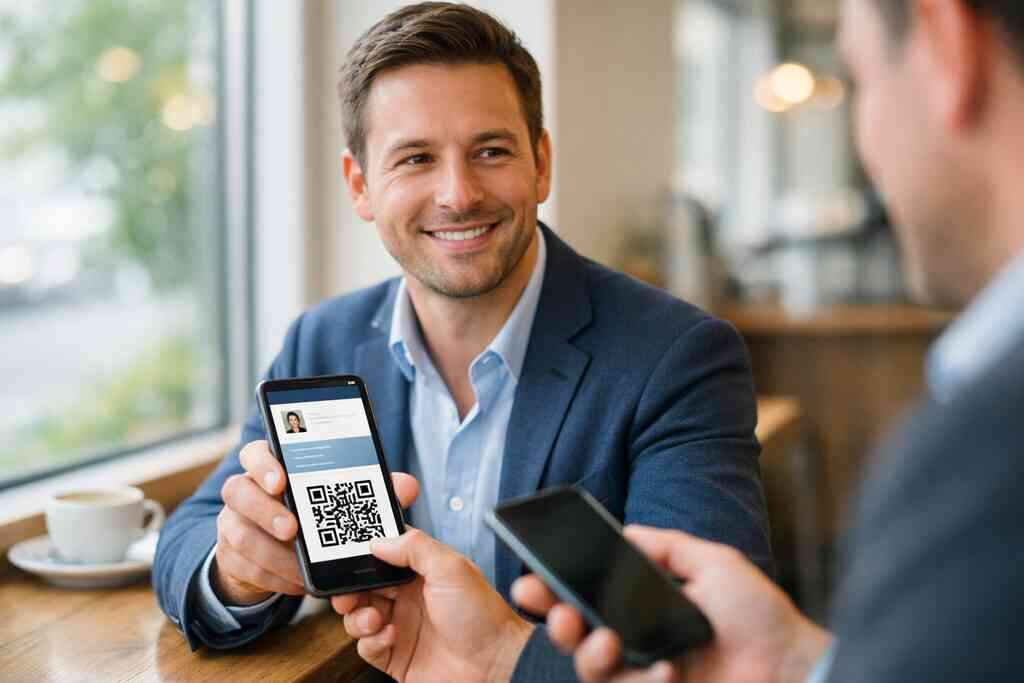
If you work in a crowded field, custom branding may be worth the extra effort. If you are a solo consultant, clarity may matter more than decoration. Either way, the goal is the same. You want people to remember you without confusion. That is where business card design and branding basics still apply, even in digital form. You can also review custom branding tips for digital business cards for practical ideas.
QR code business cards and NFC business cards when contactless sharing matters
QR code business cards and NFC business cards solve the same problem in different ways. QR codes work through camera scanning. NFC cards work by tap-to-share contactless sharing. Both support electronic business card exchange. Both can reduce friction at busy events. And both are useful when hands are full. NFC technology is built on short-range data exchange, which is why it feels so immediate. QR codes rely on the ISO/IEC 18004 standard, which is why they scan reliably across devices. If you want to compare contactless options, NFC vs. QR code digital business cards is worth a look. Apple’s Core NFC framework also supports reliable tap behavior on compatible devices. That technical foundation matters when you want sharing to feel instant, not awkward. Where small business owners get the most leverage from one share
One share can do more than replace a handshake. It can start a lead, trigger a follow-up, and keep your name in the right inbox. That leverage matters most when you meet people under time pressure. Sales, real estate, and client-facing service work all reward speed. The card that is easiest to save often becomes the one that gets remembered.
Sales professionals and lead capture at conferences, showings, and client meetings
Sales professionals live and die by follow-up. Conferences are loud. Showings are rushed. Client meetings move quickly. A digital business card for LinkedIn sharing or direct phone exchange helps you keep momentum. It also makes lead capture feel natural instead of forced.
One rep we spoke with in a Commack co-working space said the hardest part was never the pitch. It was the aftermath. People would ask for info, then vanish into another meeting. Once they started using a digital card, the handoff became cleaner. The contact was saved before the elevator doors closed. That is a small difference with real sales value.
Why real estate agents on Long Island and in NYC benefit from instant contact exchange
Real estate agents need speed, clean branding, and easy contact access. A digital business card for real estate agents makes that easier. One quick share can include listings, socials, and a direct call button. That matters during open houses, staging visits, and broker events. It also matters when a client is juggling three other agents.
On Long Island and in NYC, timing can decide whether a lead stays warm. A Garden City agent told us their best results came after replacing handwritten notes with instant sharing. The prospect scanned, saved, and called back later that evening. No paper got lost. No name got misread. For many agents, digital business cards for real estate agents in NY are the clearest proof of how simple the shift can be.
Freelancers and corporate teams using digital business cards for networking without the paper pile
Freelancers need flexibility. Corporate teams need consistency. Both groups benefit from digital business cards for networking because the card can be standardized or personalized. Freelancers can keep their brand sharp. Teams can keep contact details aligned across departments. That is far easier than chasing a tray of old print cards.
There is also a sustainability angle. Sustainable business cards reduce waste and reordering. Paperless networking also makes life simpler for people who meet dozens of contacts each month. Here is what almost no online guide mentions: the paper pile is not just clutter. It is a follow-up problem. Less clutter means fewer missed leads.
CRM integration, digital card analytics, and follow-up automation in plain English
CRM integration means your contact exchange can feed into your customer system. Digital card analytics means you can see which profiles or links get viewed. Follow-up automation means the next message can happen faster. None of that needs to sound technical. It just means less manual work.
If your platform supports lead capture tips with digital business cards, you can turn one exchange into a usable record. That is useful for small business owners who hate data entry. It is also helpful for teams that want cleaner handoffs. GDPR considerations matter too if you store shared contact details. Collect only what you need, explain how you use it, and keep permission clear.
The decision that turns a digital card into a daily tool
The best digital business card is the one you will actually use every day. That sounds obvious, but people often choose based on novelty instead of fit. A practical setup should work at meetings, conferences, and quick introductions. It should also match your budget and comfort level. If it does not, it will sit unused.
Free digital business card versus premium digital card plans when value matters
A free digital business card can be enough for simple sharing. That may work if you only need basic contact exchange. Premium digital card plans usually make more sense when you need brand control, team use, or deeper tracking. The right answer depends on your use case, not the label.
OptionBest forCommon tradeoffFree digital business cardBasic personal sharingLimited customizationPremium digital card plansBranding and team useHigher costTemplate-based setupFast launchLess uniquenessCustom brandingStrong identityMore setup timeIf you are comparing options, check digital business card pricing and plan comparison carefully. Do not assume the cheapest plan is the best value. Look at what you will actually use. A low price means little if the card feels too limited on day two.
What to compare on the pricing page before you commit
The pricing page should answer a few practical questions. Can you customize branding? Can you update business card details easily? Can your team share one standard format? Can you track views or leads? Can you switch plans without a mess?
Compare these items before you decide:
- Branding flexibility
- Team management
- Sharing methods
- Analytics access
- Contact export options
- Support quality
That list keeps you focused on use, not hype. The How It Works page should also make onboarding clear. If the setup sounds confusing, that is a warning sign. Good tools should save time, not create a training project.
How to use digital business cards near me searches, LinkedIn sharing, Apple Wallet business card options, and local networking in Suffolk County and beyond
People often search for digital business cards near me when they want a local provider they can trust. That makes sense. Local support feels easier when you are in Long Island, New York, or nearby NYC. If you network in Suffolk County, at trade groups, or through commuter circles, a digital card can travel with you. LinkedIn sharing also helps keep your profile and contact info aligned.
Apple Wallet business card options can be useful for people who prefer quick access. Google Pay card behavior may help in similar ways, depending on setup. The point is not the wallet app. The point is immediate access. If you want a smoother rollout, digital business cards for small business owners in Long Island and NYC gives you a local place to start. That matters when your next introduction could happen at lunch, in a lobby, or outside a train platform. For broader context, digital business cards vs. paper cards is also a useful comparison.
Your next move with Digital Business Cards on Long Island before your next introduction
If you are still using paper, do not overhaul everything at once. Start with one card. Add the contact details you use most. Test how it looks on your phone. Then share it with one real prospect before your next event. That is enough to learn what works.
You do not have to figure out every feature today. You also do not need to chase every platform. Start with a clean card, a clear message, and one reliable sharing method. If you want help, contact Digital Business Cards for support or questions. One careful setup now can save you a lot of awkward follow-up later.
Frequently Asked Questions
Question: What makes digital business cards better than paper cards for small business networking on Long Island, New York?
Answer: For many small business owners, the biggest advantage of digital business cards is simple: they make it much easier to share contact info and keep it in one place. Paper cards can get smudged, lost, or separated from the conversation that made them meaningful. A digital business card, online business card, or virtual business card helps solve that by letting you share your business card details instantly through a link, QR code business cards, or other contactless sharing methods. That can be especially helpful in Long Island, Suffolk County, and NYC networking situations where people move quickly between meetings, commutes, and events. It also supports paperless networking and sustainable business cards, which many owners appreciate. If your goal is to make follow-up easier and reduce the risk of losing contacts, a digital card vs. paper approach is often the more practical choice.
Question: How do I create digital business card details that actually look professional and not generic?
Answer: A strong digital business card design starts with clarity. Keep your name, title, phone number, email, and website easy to find, then add only the links that truly help people understand what you do. Good virtual card design should feel clean, readable, and consistent with your brand. If you are using a business card template or digital business card templates, choose one that supports your style instead of overwhelming it. Many people wonder how to make a digital business card look polished, and the answer is usually to keep it focused. A good digital card maker should make it easy to create digital business card details without technical stress. Whether you are building a smart business card for a solo practice or a small business team, the goal is the same: make it easy for people to remember you and reach you later.
Question: In the blog Digital Business Cards for Small Business Owners A 2026 Guide, what should I look for in the best digital business card platforms?
Answer: When comparing the best digital business card platforms, focus on how well the tool fits your real workflow. Look at whether you can update business card details easily, use custom branding, share through QR code business cards or NFC business cards, and keep the experience simple for the person receiving your card. It is also wise to compare digital card pricing, free digital business card options, and premium digital card plans based on what you actually need, not just the headline price. If you work in sales, real estate, freelancing, or corporate teams, you may also want to check digital card analytics, CRM integration, and follow-up automation options. The best choice is usually the one that helps you share contact info quickly and consistently, while still matching your brand and your networking style.
Question: Are digital business cards useful for sales professionals, real estate agents, freelancers, and corporate teams?
Answer: Yes, because each of those groups benefits from faster follow-up and cleaner contact exchange. Sales professionals often need a digital business card for LinkedIn sharing, conferences, and quick lead capture. Real estate agents may need instant access to listings, direct calls, and a professional business card design that works well at open houses and client meetings. Freelancers often want a flexible online business card that reflects their brand without printing new cards every time something changes. Corporate teams may prefer a consistent digital business card template so everyone shares the same information and branding. In all of these cases, digital business cards for networking can reduce friction and help keep the next step simple. That is especially useful when a lead is warm and timing matters.
Question: Does Digital Business Cards support contactless sharing, Apple Wallet business card options, or Google Pay card use for local networking?
Answer: Digital Business Cards is built around making it easier to share and store contact information in one place, which aligns well with contactless sharing and modern networking habits. Based on the company’s description, you can create a digital business card and share it through a QR code, email, or a link, which makes electronic business card exchange straightforward. If you are considering Apple Wallet business card or Google Pay card workflows, it is best to confirm the exact current options directly with the company, since specific digital business card features should always be verified before you commit. What you can count on conceptually is a simpler way to share contact info across Long Island, New York, Suffolk County, and NYC without relying on paper. That makes it a practical choice for people who want a cleaner, faster networking experience.
Question: How can I get started with a free digital business card or premium digital card plan without overcomplicating my setup?
Answer: The easiest way to start is to think about how you actually network. If you only need a basic digital business card for occasional sharing, a free digital business card may be enough. If you want more room for custom branding, team use, or deeper digital card analytics, premium digital card plans may be worth exploring. Before you decide, review the digital business card app or platform carefully and confirm which digital business card features are included. A good first step is to create a simple business card example with your essential business card details, test it on your phone, and share it with one real contact. That lets you see whether the digital card maker is easy to use and whether the card fits your style. If you are searching for digital business cards near me in Long Island or NYC, Digital Business Cards is positioned as a local option that can help you move from paperless networking to a more reliable digital workflow.